Answer Claude Code from your notch
You kick off a Claude Code run, switch to the browser, and come back ten minutes later to find it stopped almost immediately, waiting on one Allow. Crest, a Mac notch app, puts that prompt on the notch the moment it fires: tap Allow or Deny, and the answer lands back in your terminal.
Updated September 25, 2026
Run the unit tests before the release.
> run the tests before the release
⏺ Bash(npm test)
  ⎿  Waiting for your answer
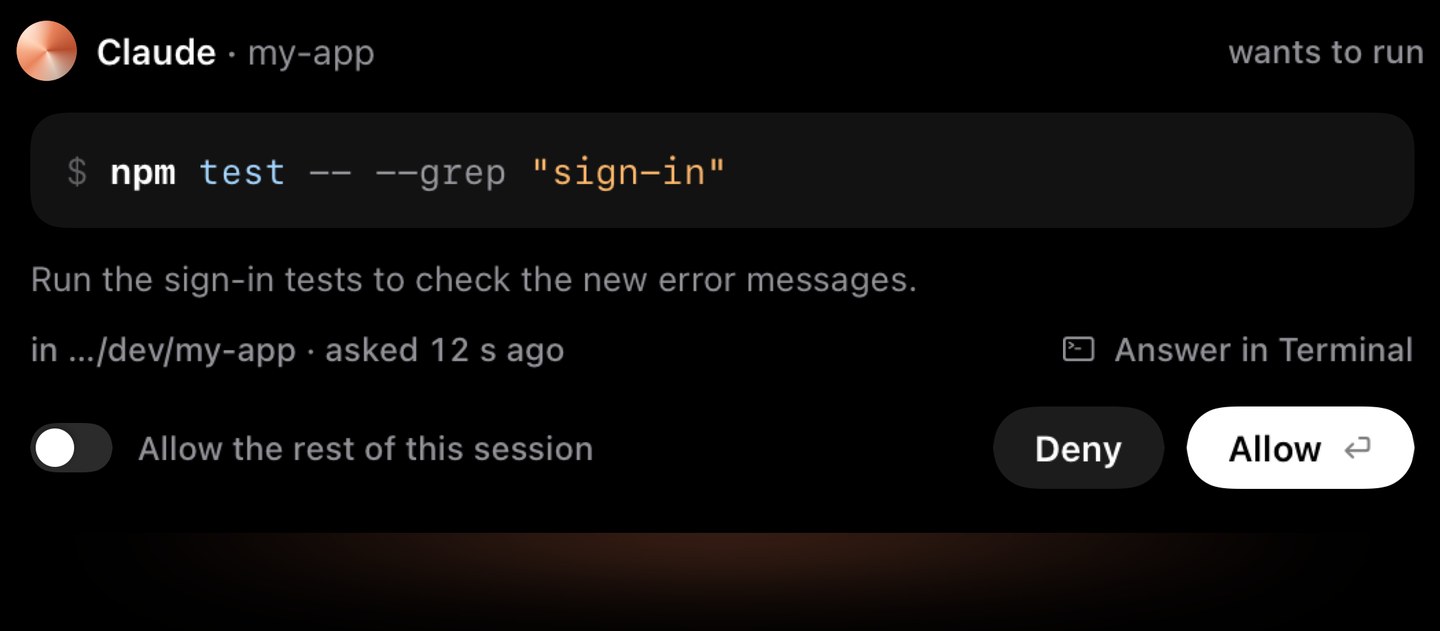
Try it: this is Crest's ask, as the notch shows it. Rest the pointer on it or click it, then Allow or Deny.
Works the same with Codex.
Answering is free, with no account. The Agents widget, with every session at a glance, comes with Crest Pro: sign in for 7 days of Pro with no card, then it's $24.99 once, with Take and Minutes, or $2.99 a month, if you keep it.
Where agent runs actually lose time
Claude Code does the work in minutes, then waits on you: a permission for a Bash command, an edit outside the allowed paths, a question with three options. If your terminal isn't frontmost, nothing tells you. The run isn't failing, it's idle, and it stays idle until you remember it exists.
The notch is the one strip of screen that's visible in every app, on every desktop. That makes it the right place for exactly this.
A prompt you can't miss
When Claude Code needs you, Crest shows a pill at the notch and keeps it there until you answer:

- Every display, even over fullscreen apps. Writing in a fullscreen editor or presenting on an external screen doesn't hide it.
- A chime, a macOS notification, and an orange menu-bar icon back it up, so a prompt registers even when you're looking elsewhere.
- Allow and Deny are one click. When Claude asks a question with options, the options are right there too, with room for your own answer.
- The whole ask, before you allow it. Rest the pointer on the prompt and the allow sheet opens under the notch: the full command, or the file and the lines it changes, or the URL and what Claude wants from it. Deny and Allow stay where they are, and nothing is sent until you press one.
- Answer in Terminal hands the prompt back to the CLI when you'd rather answer there.
When Claude asks you a question
Not every stop is a permission. Sometimes Claude Code asks you to choose: which approach, which file, which checks to run. That is its AskUserQuestion tool, and in the terminal it is a picker you answer with the arrow keys. Crest puts that picker on the notch.

The closed notch shows Claude and how many questions are waiting. Rest the pointer on it and the card opens:
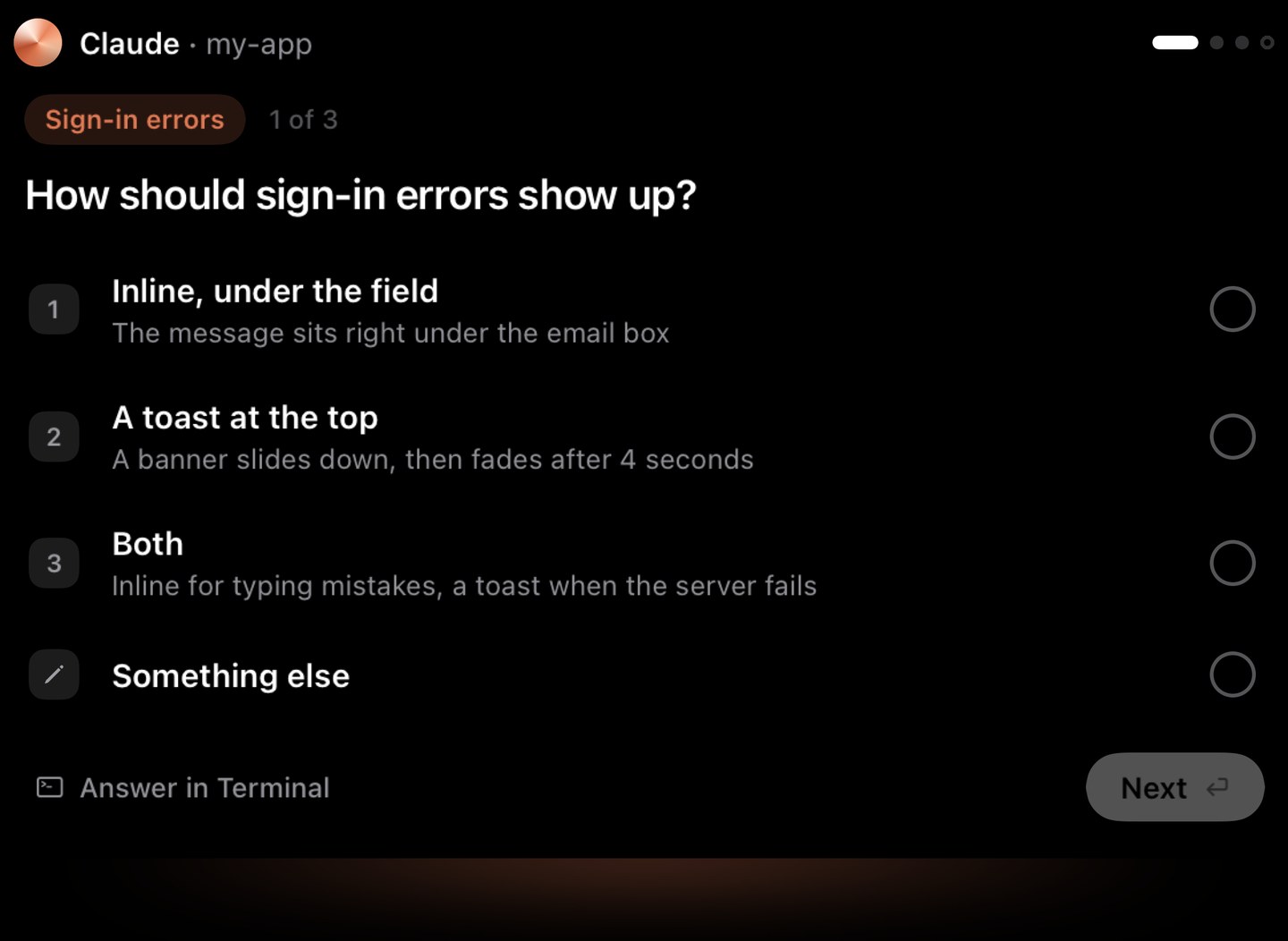
- A single choice is one tap. Tap the option and it is answered; there is nothing else to press.
- Several questions at once come as one-question cards. Tap through them, and tick what applies on a checkbox question.
- Your own words. On a single-choice question, Type something opens a field on the card. Write the answer none of the options gave you and it goes in as your reply, the way the terminal's own "Type something" would take it.
- It lands in the session itself. Crest types your answer into the terminal Claude is running in, so Claude gets an ordinary answer, not a denied tool. macOS asks once for Accessibility so Crest can type; until you allow it, the card stays and In terminal hands the question back.
- Questions are never answered for you. Not even in a trusted session: they are the decisions you meant to make.
Trust a session you are watching
Some runs you are happy to let go. Turn on "Allow the rest of this session" on the allow sheet, and this prompt and the rest of that session's are allowed for you, each with a reason Claude can see, until the session ends. A new session always starts asking, and questions still come to you.
Hooks, not hacks
Crest uses Claude Code's own hook system: a PreToolUse hook in ~/.claude/settings.json, with a backup of the file kept. Your tap writes the decision and the hook relays it to the CLI. Nothing is patched or injected.
Read-only tools are never intercepted, so the notch only speaks up for actions that actually need you. If Crest isn't running, the hooks step aside and you get the normal terminal prompt: a closed Crest never stalls a run. Flip the toggle off and the hooks are removed, stock behavior restored.
Codex approvals in the notch too
If OpenAI's Codex CLI is on your Mac, the same toggle adds hooks for it too (~/.codex/hooks.json, only written when Codex actually exists). Permission requests show the same Allow/Deny at the notch, and sessions running with bypassPermissions are answered allow instantly, because you asked for autonomy there.

Crest registers three Codex handlers, and two of them you never see. SessionStart records which terminal the run is living in, so a Codex session in the notch can jump you back to the exact tab it started from, tmux pane included. PermissionRequest is the one you do see: it holds the run while the notch waits for your tap. Stop clears the card when the run ends, so nothing is left sitting there after the work is done.
Close Crest and the hook returns no decision at all, which hands you straight back to Codex's own terminal prompt. It checks that Crest is actually running before it waits on anything, so a quit app costs you nothing.
One honest wrinkle: Codex runs a new hook only after you review and trust it. At its next start it warns you and points you to /hooks, where you trust the exact definition once. Crest tells you that up front rather than working around the consent gate.
Codex has its own page: what Codex's built-in notifications already do, what the hook writes to ~/.codex/hooks.json, and the trust step.
GitHub Copilot CLI approvals too
Since Crest 5.1.4 the same toggle covers GitHub Copilot CLI. Crest writes one file of its own, ~/.copilot/hooks/crest.json, only when Copilot has been run on the Mac, and never touches your own Copilot hooks. Its requests show the same Allow and Deny at the notch, and a session you started with --yolo, --allow-all or an --allow-tool rule never reaches the notch, because you asked Copilot to decide there. There is no trust step. More on the Copilot CLI page.

The rest of the Code page
Approvals are one piece of Crest's Code page. With Crest Pro, live Claude Code, Codex and Copilot CLI sessions sit in the Agents widget with their status, and a click jumps you back to the exact terminal they run in, tmux pane included. GitHub pull requests and CI, system stats with every running app a hover from Quit or Force quit, your SSH hosts (the ones you save and the ones already in ~/.ssh/config), and a file Shelf and a Clipboard live alongside as widgets.
Crest 6 also has a Claude widget: ask it things by voice or text, or tell it what to add to your calendar, to-dos and notes, on your own Claude subscription with no API key.
Set it up in two minutes
- Download Crest (free, no account, signed and notarized so macOS installs it without warnings).
- Open Crest's Settings, go to Coding agents and turn on Allow or deny commands here. It installs the Claude Code hook, plus Codex if you have it, with backups kept.
- Start a run and tab away. The next permission prompt lands on the notch.
Answering from the notch is free, with no account. Crest Pro adds what keeps a long run going: a warning before your Claude or Codex limit runs out, with the time left at your pace, and the Agents widget, which lists every running session and takes you to its terminal in one click. Pro, with Take and Minutes, is $24.99 once or $2.99 a month. Signing in starts a 7-day full-Pro trial, no card, so you can put a real workday through it before paying.
Buying for a team? Team seats cover 5 to 50 people, each with Crest Pro, Take and Minutes, from $12 a person, paid once. You hand the seats out yourself. More than 50, or a question first? Email us. For IT: what leaves the Mac, invoices and rollout.
Frequently asked questions
Do I need an API key?
No. Crest hooks into the Claude Code CLI you already run on your Claude subscription. Nothing extra to sign up for, no key to paste.
What happens if Crest isn't running?
The hooks step aside and Claude Code shows its normal terminal prompt. A closed Crest never stalls a run.
Does it work with Codex?
Yes, through Codex's own hooks. Codex asks you to review and trust them once in /hooks at its next start, and bypassPermissions sessions are auto-allowed. More on the Codex page.
Does it work with GitHub Copilot CLI?
Yes, since Crest 5.1.4, through Copilot's own hooks, with no trust step. Sessions started with --yolo, --allow-all or an --allow-tool rule stay with Copilot. More on the Copilot CLI page.
Can I answer Claude's questions from the notch?
Yes. When Claude Code asks you to choose, the notch shows Claude and the question count, and the card opens with the options. A single choice is one tap, several questions come as one-question cards you tap through, and Crest types your answer into the session. macOS asks once for Accessibility so it can type.
Can I type my own answer?
Yes, on single-choice questions. Type something opens a field on the card, and what you write goes into the session as your answer.
Can I stop being asked for one session?
Yes. Turn on "Allow the rest of this session" on the allow sheet and that session's permission prompts are allowed until it ends. Questions still come to you.
Is this free?
Yes, answering Claude Code from the notch is free: its permission prompts and questions work on Crest's free tier, with no account. Crest Pro adds what keeps a long run going: a warning before your Claude or Codex limit runs out, with the time left at your pace, and the Agents widget, which lists every running session and takes you to its terminal in one click. Pro, with Take and Minutes, is $24.99 once or $2.99 a month. Signing in starts a 7-day full-Pro trial, no card, so you can put a real workday through it before paying.
Will I see prompts over fullscreen apps or on a second display?
Yes. The pill shows on every display, even over fullscreen apps, with the chime, notification and orange menu-bar icon backing it up. It sticks until you answer.
Can I still answer in the terminal?
Always. Every notch prompt has an Answer in Terminal button, and with Crest closed the terminal prompt appears as normal.
Can I see the full command before I allow it?
Yes. Rest the pointer on the prompt for half a second and the whole ask unfolds under the notch: the full command, an edit's file with the lines it removes and adds, or a fetch's URL and prompt, with who asked and when. Nothing is sent until you press Deny or Allow.
More on how Crest compares: the best Mac notch apps in 2026, Crest vs NotchNook, and Crest vs The Boring Notch. Neither NotchNook nor The Boring Notch answers coding agents from the notch.
Nothing slips past the notch
Signed, notarized, and easy on your battery. Answering your agents is free for good; one $24.99 purchase unlocks the 14 Pro widgets, the Agents widget with every session among them, and adds Take and Minutes. Or subscribe from $2.99 a month.
macOS 14 or later · any Mac, best on a MacBook with a notch · buying for a team? team seats or email us