Answer Claude Code and Codex without leaving what you’re doing.
Their questions open in your notch. Crest also fills your passwords and 2FA codes, and they sync with your iPhone.
★★★★★ “…I have one pane of glass into 3 productivity apps that I use all the time.” SteveB, verified buyer
 Crest Pro
$14.99
Pay once and use it on 2 Macs, with updates through Crest 7.
Crest Pro
$14.99
Pay once and use it on 2 Macs, with updates through Crest 7.
On your Mac
Crest puts Claude Code and Codex, your passwords and 2FA codes, your notes and reminders, music and Drop in the notch.
On your iPhone
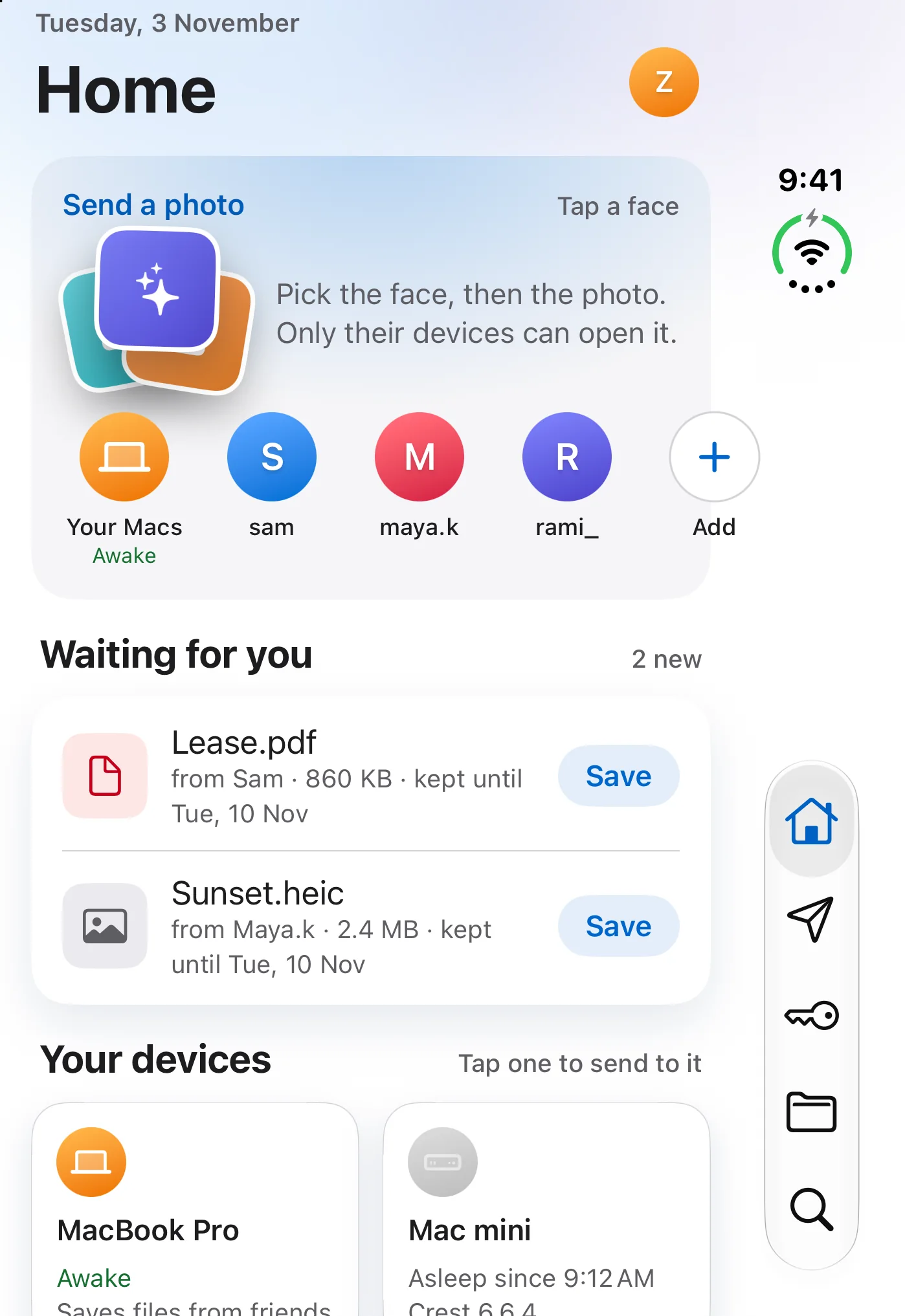
Your passwords and 2FA codes are the same as on your Mac, kept in sync and end to end encrypted. Your reminders are there too. Crest for iPhone is a free public beta.
Claude Code and Codex
Approvals and questions open in your notch.
Allow a command with one click, or answer several questions in a row, and your answers go straight to Claude, even with the terminal behind. Your 5-hour and weekly limits sit right there too.
The Authenticator · 2FA codes
Also on iPhoneCrest types your 2FA codes in for you.
When a site asks for a code, the notch offers it and Fill in types all six digits. Crest can also add a new code from a QR on your screen, and your iPhone gets it too.
Passwords
Also on iPhoneFill your passwords with Touch ID.
Click into a sign-in form in Safari, touch the sensor, and Crest types your email and password for you. The logins you save here show up on your iPhone.
Drop
Also on iPhoneDrag a file to your notch and it lands in a friend’s.
Add friends by name, let go on their picture, and the file arrives in their notch, encrypted. Friends without Crest get a link instead. From your iPhone, you can share a photo or a file straight into a friend’s notch.
Crest Cloud
Also on iPhoneKeep files in Cloud, straight from the notch.
Drop a file or a folder on Keep in Cloud and it is encrypted on your Mac before it uploads. Get it back on any of your Macs or your iPhone, or share a link.
Music and widgets
Your music, calendar and weather live in the notch too.
Now Playing has a heart for your Apple Music favorites, and 22 widgets sit on pages you swipe through.
Notes
Write it down without opening an app.
Notes and reminders live in the notch, sorted into categories.
Crest for iPhone · public beta
Your passwords, codes and Drop, on your iPhone.
Safari fills your logins with Face ID, and the 2FA codes you keep on your Mac are a tap away. Files from friends land in Drop, and it works on iPhone Duo too.
Also from Crest
Take and Minutes, each once.
Take records your screen and edits as it records, and Minutes takes private notes of your calls. Each is $9.99 once.

Try everything in Crest free for 7 days.
Crest runs on macOS 14 or later. Try it free for 7 days. No card. No account. After that, Crest pauses until you buy. Your passwords, codes and notes always stay yours.
Got a link from a friend? Open it in Crest to get 20% off Crest Pro.
Loved by Mac power users and developers.
Reviews from Mac developers, creators, and daily power users.
4.6 / 5 · 20 reviews
Its funny with the macbook pro I found it a pain that the notch took out my list of apps at the top. Crest was able not only fill in this needed space but also give me all the apps and widgets of what is currently going on that Apple should have put in play at the begining. Now I find it a needed app on all my monitors even if the notch isnt there! If you even thinking about it just get it!! Its well worth the cost.
Loving everything Crest Notch has to offer! Just wish for keyboard shortcuts to manage window tiling.
Best MacBook notch application I've found.
Was first drawn to Crest. I have tried 426 different "notch apps" and Crest is the one I have enjoyed using the best. With the integration into Crest that Minutes and Take has, I have one pane of glass into 3 productivity apps that I use all the time. Zack is responsive and gracious when I bombard him with questions.
its great and makes it easier to swithc songs and more
Literally no complaints, great addition to the OS, love how informative and responsive it is. It's great being able to quickly access things, change the current song playing, set productivity timers etc. Great app!
Esuna app super fluida y muy bonita!
It's amazing, gives useful information on the notch and stays out of my way also.
This is the most complete solution I've ever seen for the Notch "problem."
it has helped me a lot with keeping up with my calendar and keeping my screenshots for easy access
Very useful for Work and Studies.
intuitive and easy to use, great job
great app! worth every penny
Simply, a productivity companion
Write a review
Stars and a few honest words. It goes live once we have read it. If your email matches a licence it gets a verified badge.
Thank you. It is in the queue and goes up once it has been read.
Questions14
Is there a free version?
You get 7 days of everything, counted from your first trial, with no card. It starts the first time you open Crest, with no account.
After that, Crest pauses until you buy it. Receiving files with Drop keeps working, and your saved passwords, two-factor codes and notes stay readable, so you can always copy or export them.
What do I get if I buy Crest once?
Crest with everything in it, on 2 Macs, yours to keep, with updates through Crest 7. Crest Cloud is the one part that’s a subscription, because storage costs us every month.
Crest Pro or Crest Cloud?
Crest Pro is Crest, bought once. Crest Cloud is an add-on for storage, bigger Drops and longer links, and it works with or without Crest Pro.
How big a file can I send?
During the 7-day trial, Drop sends files up to 100 MB each, 500 MB in all. Crest Pro sends files up to 2 GB each, 20 GB a month, and a file waits 7 days for your friend. Receiving is always free. Drop + Cloud sends files up to 20 GB on 50 GB, or 30 GB on 200 GB, with links that last 30 or 60 days.
Can I send to friends who don’t have Crest?
Yes. Drag the file to the notch and drop it on Copy link, then send the link any way you like: their browser downloads the file and decrypts it. Receiving in the notch needs Crest, and it’s free.
Is my stuff private?
Files you send with Drop or keep in Cloud are encrypted on your Mac before they leave it. In Cloud, names are encrypted too: our server sees sizes and dates, never names. Passwords and codes are encrypted on your Mac.
Which Macs does Crest run on?
macOS 14 or later, on Apple silicon and Intel. Macs without a notch get a small pill at the top of the screen. Minutes needs macOS 26 or later on Apple silicon.
Can I get my money back?
If something is wrong, yes: write to us within 7 days and we refund under our refund policy, and your country’s consumer rights always apply. Subscriptions cancel with one button on your account page, and yearly plans are emailed 30 days before they renew.
I had Crest before 6.6. What changes for me?
If you bought Crest, nothing changes. If you used it free, you get one fresh 7-day trial of everything, with no account and no card, and after that Crest pauses until you buy it.
Is Crest a password manager for the Mac notch?
Yes. Crest fills your username and password in Safari with one touch of Touch ID, and it works as a two-factor authenticator too, offering your 6-digit code in the notch so you never reach for your phone. You can import your vault from Apple Passwords, 1Password or Bitwarden, and the import happens on your Mac, never over the network.
Can I answer Claude Code from the notch?
Yes. When Claude Code asks a question or wants permission, the prompt opens under the notch with the whole command on it, and the agent carries on as soon as you answer. Codex and Copilot CLI ask for permission there too.
Is Crest an AirDrop alternative for sending big files?
Yes. Drag a file to the notch from anywhere and it lands in your friend’s notch, encrypted on your Mac first, and it waits there for up to 7 days. Without Cloud, Crest Pro sends files up to 2 GB each. AirDrop needs the other device close by to start, and it can’t reach a Windows PC. With Crest Pro, a friend without Crest gets a link that opens in any browser. Drop + Cloud sends files up to 30 GB.
Does Crest work like Dynamic Island on a Mac?
That is the idea. Your music, calendar, weather and timers live in the notch on pages you swipe through, and your coding agents’ questions show up there when they need you. Macs without a notch get a small pill at the top of the screen instead.
What else does Crest do?
Music, your calendar, weather, timers and the rest of Crest 6’s widgets are still there, on pages you swipe through. A review, word for word: “…I have one pane of glass into 3 productivity apps that I use all the time.” (SteveB, verified buyer)