Answer Codex approvals from your notch
You start a Codex run, switch to the browser, and come back to find it stopped a minute in, waiting for you to approve one command. Crest, a Mac notch app, shows that request on the notch the moment it arrives: Allow or Deny in one click, and one click back to the terminal tab it came from.
Last updated: September 2026
Published by the makers of Crest. Everything this page says about Codex was read from OpenAI's Codex documentation on 25 September 2026 (the hooks guide and the two configuration pages, listed under Sources at the end), and everything it says about Crest was read from Crest's own source the same day. Where Codex already does something on its own, this page says so before it says what Crest adds.
Where a Codex run waits
With the interactive on-request approval policy, Codex pauses whenever a command needs a decision from you, a shell command that wants to run outside the sandbox being the usual case. The work before that point took a minute. The wait after it lasts until you look at the terminal again, and if the terminal is behind a browser window or on the other display, that can be most of an hour.
Nothing about this is a fault in Codex. It is asking exactly when it should. The problem is where it asks: one tab, one window, one screen.
What Codex already does about it
Codex has two built-in ways to get your attention, and you should know both before you pay for anything.
- Terminal notifications.
tui.notificationsin~/.codex/config.tomlcan fire onapproval-requestedas well as onagent-turn-complete. By default it fires only while the terminal is unfocused (tui.notification_condition), and by default it sends OSC 9, a terminal escape sequence that some terminals turn into a desktop notification, falling back to a bell (BEL) where the terminal does not. - The
notifyprogram.notifyruns a program of yours with a JSON payload. As documented it fires only onagent-turn-complete, so it can tell you a turn ended; it cannot tell you an approval is waiting.
So if your terminal understands OSC 9, Codex can already tell you that an approval is waiting, and you may not need anything else. What it cannot do is let you answer from where you are. A notification is a notice: you still switch to the terminal, find the right tab, read the command and press a key. Crest puts the command and the two answers on the notch, on every display, and does the tab-finding for you.
The request on the notch

A Codex request on the notch. The pill names the agent and the command; Deny and Allow answer it without opening anything.
When Codex asks, Crest shows a pill at the notch that reads "Codex wants to run" and the command, with Deny and Allow beside it. It stays there until you answer.
- On every display, over fullscreen apps. While a request waits, the pill also appears on displays Crest is not normally on, so an approval on the screen you are not facing is still one you see.
- A chime, a macOS notification and an amber menu-bar icon back it up. The chime and the notification each have a switch in Settings.
- The whole ask before you allow it. Rest the pointer on the pill and a sheet unfolds under the notch with the full command, who asked and when, and the folder it runs in. Nothing is sent to Codex until you press Deny or Allow.
- In terminal hands the request back: the card folds and Codex shows its own approval prompt, where you answer as usual.
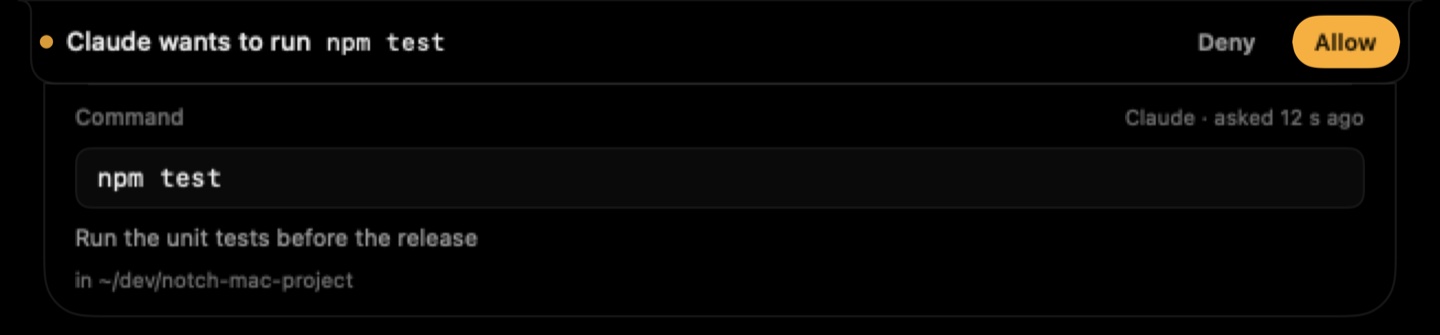
The sheet, here for a Claude Code request. A Codex request opens the same sheet with Codex in the header: the full command and the folder it runs in. Codex shell requests carry no description line, so that row is absent for them.
One click back to the tab
The part that saves the most time is not the Allow. It is getting back afterwards. Codex runs a SessionStart hook when a session begins, and Crest's handler records where that session lives: the tty, the terminal app, the iTerm2 session id and the tmux pane if there is one. The session then sits in Crest's Code mode with its status, and one click jumps you to it.
- In iTerm2 and Terminal.app the exact window and tab is selected. macOS asks once for Automation consent the first time.
- In tmux the pane is found by its tty and selected, then the terminal app comes forward.
- In Tabby, Ghostty, Warp, WezTerm, Alacritty, kitty, Hyper, VS Code, Cursor and the Codex app, the app itself is brought forward, and un-minimized if every window was hidden.
That list is what the hook script walks up the process tree looking for. The tab-level jump is iTerm2 and Terminal.app only; everywhere else it is app-level.
What the hook writes, and the trust step
Crest uses Codex's own hook system and nothing else. When you turn on "Answer prompts on the notch" in the AI Coding module, Crest writes ~/.codex/hooks.json, and only if Codex is actually on the Mac (a ~/.codex folder, or a codex binary in /opt/homebrew/bin or /usr/local/bin). It registers one POSIX shell script, codex-hook.sh in Crest's own Application Support folder, for three events:
- SessionStart records the terminal identity above. Its timeout is 20 seconds.
- PermissionRequest writes the request where Crest can see it and waits for your answer, then prints Codex's own decision JSON,
behavior: allowordeny. Its timeout is registered as a day, so the request sticks until you answer instead of dying under you, and while it waits Codex shows the hook's status message, "Answer on the Crest notch". - Stop clears any card left over when the turn ends.
Three things about how it fails, because that matters more than how it works:
- If Crest is not running, the hook returns no decision and, in the documentation's words, "Codex uses the normal approval flow". The script checks a heartbeat file Crest touches every three seconds; if it is older than 30 seconds, the terminal prompt runs. A quit Crest never stalls a run.
- If the session reports
bypassPermissionsas its permission mode, the hook answers allow at once and the notch never shows it, because you asked for autonomy in that session. - Turn the switch off and Crest removes its own entries from hooks.json and leaves any hooks of yours where they were.
Now the honest wrinkle. Codex does not run a hook you have not approved. In the words of the hooks guide, "Before a non-managed hook can run, Codex requires you to review and trust the exact hook definition", and it records that trust against a hash of the definition, so new or changed hooks are marked for review. At its next start Codex warns you that a hook needs review and points you to /hooks, where you read Crest's entry and trust it. Crest tells you this in the app instead of trying to trust itself through the config, because that gate is yours. And because the trust is a hash of the definition, Crest keeps its hooks.json entry byte for byte identical across updates, so you do this once.
One more thing to check if nothing shows up: the hooks guide says hooks are enabled by default, but [features] hooks = false in your config.toml turns every hook off, Crest's included.
Claude Code too, on the same switch
If you also run Claude Code, the same switch installs its hooks in ~/.claude/settings.json, and its permission prompts and questions land on the same notch. That has its own page: Claude Code approvals in the notch. Both agents' sessions sit side by side in Code mode, each with its own jump back.
Set it up
- Download Crest. Free, no account, signed and notarized so macOS installs it without warnings.
- Open the AI Coding module and turn on "Answer prompts on the notch". Crest writes the Codex hook if Codex is installed, and the Claude Code one if that is.
- Start Codex. It warns that a hook needs review; open
/hooks, read Crest's entry, trust it. Once. - Start a run and tab away. The next approval lands on the notch.
AI Coding is a Pro module. Crest Pro is $19.99 once, no subscription, and signing in starts a 7-day full-Pro trial with no card, so you can put a real workday through it before paying. The free tier needs no account at all. Everything, Crest Pro with Take and Minutes, is $24.99 once.
Sources
- OpenAI, Codex documentation, Hooks (developers.openai.com/codex/hooks, which answers with a permanent redirect to learn.chatgpt.com/docs/hooks). Read 25 September 2026. The lifecycle events, the hooks.json locations, the PermissionRequest decision JSON, the 600 second default timeout, "Hooks are enabled by default", and the trust rule: "Before a non-managed hook can run, Codex requires you to review and trust the exact hook definition", recorded "against the hook's current hash", reviewed with
/hooks. - OpenAI, Codex documentation, Advanced configuration (redirects to learn.chatgpt.com/docs/config-file/config-advanced). Read 25 September 2026.
tui.notificationsand itsapproval-requestedandagent-turn-completeevent types,tui.notification_method(OSC 9, then BEL),tui.notification_condition, andnotifyfiring "currently only" onagent-turn-complete. - OpenAI, Codex documentation, Configuration reference (redirects to learn.chatgpt.com/docs/config-file/config-reference). Read 25 September 2026.
approval_policyvalueson-requestandnever,sandbox_mode, the defaults for the notification keys. One discrepancy, reported rather than hidden: this table listsfeatures.hooksas off by default, while the hooks guide says hooks are enabled by default. This page follows the guide and tells you what to check if nothing shows up. - Crest source, read 25 September 2026: CodexHook.swift (what is written to hooks.json, the script, the trust note), AgentMonitor.swift (the pending scan, the decision JSON, the chime and the notification, Codex sessions), TerminalJumper.swift (the jump back), ApprovalDetail.swift and ApprovalDetailView.swift (the sheet), NotchController.swift (the pill on every display), AppDelegate.swift (the menu-bar item), DeveloperView.swift (the toggle and the In terminal button). Nothing on this page was taken from memory.
FAQ
Does Codex CLI notify you when it needs approval?
Yes, on its own. tui.notifications in ~/.codex/config.toml can fire on approval-requested, as a desktop notification in terminals that understand OSC 9 and as a bell elsewhere, by default only while the terminal is unfocused. The notify program does not: it fires only on agent-turn-complete. Crest adds the answer itself, Allow and Deny on the notch, plus one click back to the terminal tab.
Do I need an API key or an OpenAI account for this?
Nothing beyond what Codex already uses. Crest hooks into the Codex CLI you run, however you sign in to it, and never contacts OpenAI itself. A Crest account is only for the 7-day Pro trial or a purchase; the free tier needs none.
What happens if Crest isn't running?
The hook returns no decision and Codex uses its normal approval flow, so you get the usual terminal prompt. The script checks a heartbeat Crest touches every three seconds and steps aside when it is older than 30 seconds. A closed Crest never stalls a run.
Why does Codex ask me to trust the hook?
Because Codex runs no non-managed hook until you have reviewed and trusted its exact definition, and it records that trust against a hash of the definition. At its next start it points you to /hooks, where you read Crest's entry and trust it. Crest keeps that entry byte for byte identical across its updates, so the review happens once.
What if my session never asks for approval?
Then there is nothing to show, and the notch stays quiet. With approval_policy set to never, Codex does not pause for approval at all, and a session whose hook payload reports bypassPermissions is answered allow by Crest's hook at once.
Can I still answer in the terminal?
Always. Every request on the notch has an In terminal button that hands it back to Codex's own prompt, and with Crest closed that prompt appears as normal.
Can I see the full command before I allow it?
Yes. Rest the pointer on the pill and the sheet unfolds under the notch with the full command, who asked and when, and the folder it runs in. Nothing is sent to Codex until you press Deny or Allow.
Is this free?
AI Coding is one of Crest's Pro modules. Crest Pro is $19.99 once, no subscription, and the 7-day trial you get when you sign in covers everything, no card needed. The free tier, which needs no account, keeps Now Playing, the Shelf with clipboard history and window snapping.
Does it work with Claude Code as well?
Yes. The same switch installs Claude Code's hooks, and its prompts and questions land on the same notch. Claude Code has its own page at crestnotch.app/claude-code-notch.
Try Crest free
Download it with no account. Now Playing, the Shelf with clipboard history and window snapping are free for good, and signing in gives you 7 days of Pro with no card. Pro is $19.99 once, on 2 Macs.
Download Crest for macOS Get Crest Pro, $19.99macOS 14 Sonoma or later · signed and notarized by Apple · 7-day refund
Keep reading: Claude Code in the notch · Best Mac notch apps in 2026 · Dynamic Island for Mac · Notch dimensions by model · Facts and prices · Crest overview