The best screen recorder for Mac in 2026
By the makers of Take · updated October 2026 · full disclosure

macOS 14 or later, on Apple Silicon and Intel. 7-day trial, no card, no watermark.
| Take | Screen Studio | CleanShot X | Loom | |
|---|---|---|---|---|
| Price | $9.99 once | ~$108/year | $35 once | Free to $15/user/mo |
| One-time, no subscription required | Yes | No | Yes | No |
| No watermark on recordings | Yes | Yes | Yes | No, the free plan brands recordings |
| Cinematic auto-zoom staging | Yes | Yes | Yes since 5.0 | No |
| Live edit, preview equals export | Yes | No, renders on export | No | No |
| Plain files, no proprietary project | Yes | No, project-based | Yes | No, cloud-hosted |
| Works fully offline | Yes | Yes | Yes | No, cloud-based |
| Native Mac app, not Electron | Yes | Yes | Yes | No |
| iPhone capture with device frames | Yes | Yes | No | No |
Why Take is our pick
- You buy it once. Take is $9.99 once.
- It arrives staged. Take zooms from your clicks, smooths the cursor and speeds up the dead air for you.
- No watermark. There is none on the trial and none after it.
- Editing is live. What you see in the preview is exactly what gets exported, so you never sit through a render.
Download Take freeBuy Take, $9.99
macOS 14 or later · 7-day refund
Full comparison and details
Most screen recordings look the same: a jittery cursor, nothing zoomed, and a minute of you hunting for the right window. Then you open an editor to fix it, and half the good recorders now want a monthly payment for the privilege. Below are the four that Mac users actually reach for in 2026, Take, Screen Studio, CleanShot X and Loom, and the one-time versus subscription question runs through every pick. We make Take, and we built it as a native Mac app that stages the recording while you capture it, so this list starts there.
Last updated: October 2026
Full disclosure: this roundup is published by the makers of Take, part of the Crest suite. The other three apps' prices and limits are taken from their own pages.
The short list
- Polished demos at a one-time price: Take, $9.99 once.
- A cinematic recorder you can only rent now: Screen Studio, about $108 a year.
- A screenshot tool that also records: CleanShot X, $35 once with one year of updates.
- A hosted link instead of a file, billed per user: Loom.
1Take, best for polished demos at a one-time price
$9.99 once · native · offlineTake records your Mac screen and hands back a staged clip, with the backdrop, padding, smoothed cursor and automatic zooms already applied. It edits live, so the preview on the canvas is exactly the file you export, with no render step. Recordings are plain .mov files in a folder you own, with no watermark and no cloud.
- It captures a connected iPhone in a real device bezel, and exports a 9:16 vertical for Reels and Shorts, or a .gif.
- It records your mic and system audio, shows a live camera bubble that stays off until you turn it on, and draws click rings and keystroke keycaps.
- Zooms, sped-up pauses, blurs and clips sit on one strip where you can drag, resize or delete them, and one compositor draws both the preview and the export.
- You pay $9.99 once, it works offline after a single activation, and it runs on any Mac, Apple Silicon or Intel, on macOS 14 or later.
- Go live presents the same staged screen in Google Meet, Zoom or FaceTime through a virtual camera. None of the other three do this.
Best for: product demos, tutorials and launch clips where you want a directed look without renting your software.
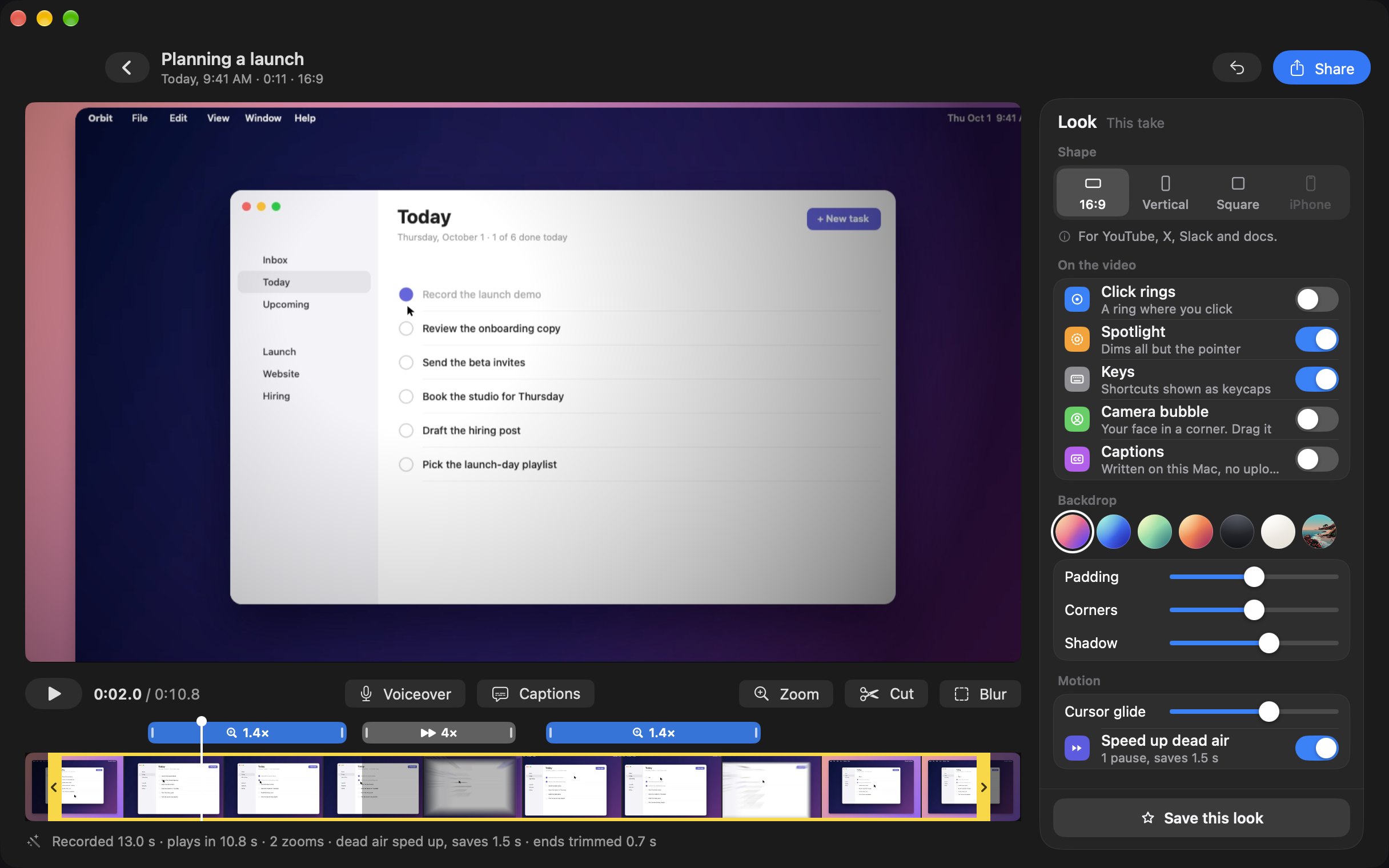
This is Take's editor: every zoom and speed-up sits on the strip, where you can drag or delete it, and the preview is the export.
2Screen Studio, the cinematic recorder you rent
~$108/year · native · subscriptionScreen Studio stages captures automatically and records a connected iPhone with device frames. The catch is that new buyers can only rent it now, which is the main reason we built Take as a one-time purchase.
- The catch for 2026 is the price: new buyers are on a subscription of about $29 a month or $108 a year, and one-time licences are no longer sold to new buyers.
- Editing is project-based with a render step on export, so you wait to see the final file.
See the full Take vs Screen Studio breakdown.
3CleanShot X, a screenshot tool that also records
$35 once · native · one-timeCleanShot X is a capture toolkit for the Mac, with screenshots, scrolling capture, annotation, a webcam overlay and smart blur, plus screen recording.
- One-time $35 for one Mac with a year of updates, then an optional $19 a year if you want to keep updating.
- It does not record an iPhone with device frames.
For demo videos people will watch to the end, Take does more of the work for you, on two Macs instead of one.
4Loom, a cloud link billed per user
subscription · cloud-hostedLoom records your screen and camera and hosts the video in its cloud, so your recordings live on its servers and its plans are billed per user.
- It is a subscription: the free Starter plan brands recordings and caps their length, and the Business plan (about $15 per user a month) removes the branding.
- It is cloud-first rather than a native offline Mac app, so your recordings live on Loom's servers.
Side by side
The comparison table is at the top of this page.
The marks reflect each app's own documentation and pricing as of July 2026. Product names and marks belong to their owners.
How to choose
If you make demo videos, tutorials or launch clips, start with Take. It gives you the staged, auto-zoom look as a one-time purchase, it edits live so the preview is the file, and it can present that staged screen in a call. Screen Studio is rented by the month or the year, CleanShot X stops updating after a year unless you pay $19 a year, and Loom keeps your recordings on its servers and bills per user. The real difference is whether you want a file you own for a one-time price or a tool you rent every month.
FAQ
What is the best screen recorder for Mac in 2026?
For demo videos, tutorials and launch clips, it is Take: it stages the recording for you, edits live, and you pay $9.99 once. Screen Studio is subscription-only for new buyers, CleanShot X is a screenshot tool with one year of updates, and Loom keeps your videos in its cloud and bills per user.
What is the best free screen recorder for Mac?
macOS includes QuickTime Player, which records your screen for free with no editing (how to screen record on a Mac). For a staged recorder, Take has a 7-day trial with no card and no watermark, and Loom has a free plan that brands recordings and caps their length.
Which Mac screen recorders have no watermark?
Take, Screen Studio and CleanShot X export without a watermark. Loom's free plan brands recordings, so you need a paid plan to remove it.
What is the best screen recorder for product demos and tutorials?
Take. It auto-stages with zooms, a smoothed cursor and a backdrop, which is what makes a demo look directed. Take is $9.99 once and edits live so the preview is the export, while Screen Studio is a subscription and renders on export.
Is there a one-time Mac screen recorder with no subscription?
Yes. Take is $9.99 once, with no subscription and no watermark. CleanShot X is $35 once. Screen Studio moved new buyers to a subscription, and Loom is subscription-based.
Read more about screen recording on a Mac in these guides:
Want the polished-demo pick?
Take stages every capture and edits it live, so the recording you export is the one you already watched. You get plain files with no watermark, and you never need a subscription: Take is $9.99 once.
Buy Take, $9.99 Try free for 7 days7-day trial, no card up front. macOS 14 or later, universal (Apple Silicon and Intel). See the suite pricing.
Keep reading: Screen Studio alternatives · vs Screen Studio · vs Loom · vs CleanShot X · vs Descript · vs Camtasia · vs ScreenFlow · No watermark, no time limit · Record a demo that looks edited · Take overview · Record a Zoom, Teams or Meet call