A screen recorder, a meeting notetaker, and a control room that lives in your MacBook notch. Every feature below ships today. Buy one for $19.99 to $24.99, or all three for $49.99, and it stays bought: no subscription, and nothing you record leaves your Mac.
Music, the next meeting, your todos, CPU and battery, your clipboard, your servers, and an AI that can act on them. All of it one glance up, none of it a window.
Recordings that look edited the moment they stop. Zooms, a smoothed cursor, a real backdrop, and a timeline where what you see is exactly what exports.
Notes written while you talk, both sides transcribed, decisions and promises pulled out, all of it on your Mac with nothing uploaded anywhere.
A borderless panel that hangs from the notch. It never takes focus, never steals a click from your menu bar, and sleeps when your Mac does. The free tier is a real app, not a demo: Pro unlocks the rest, once.

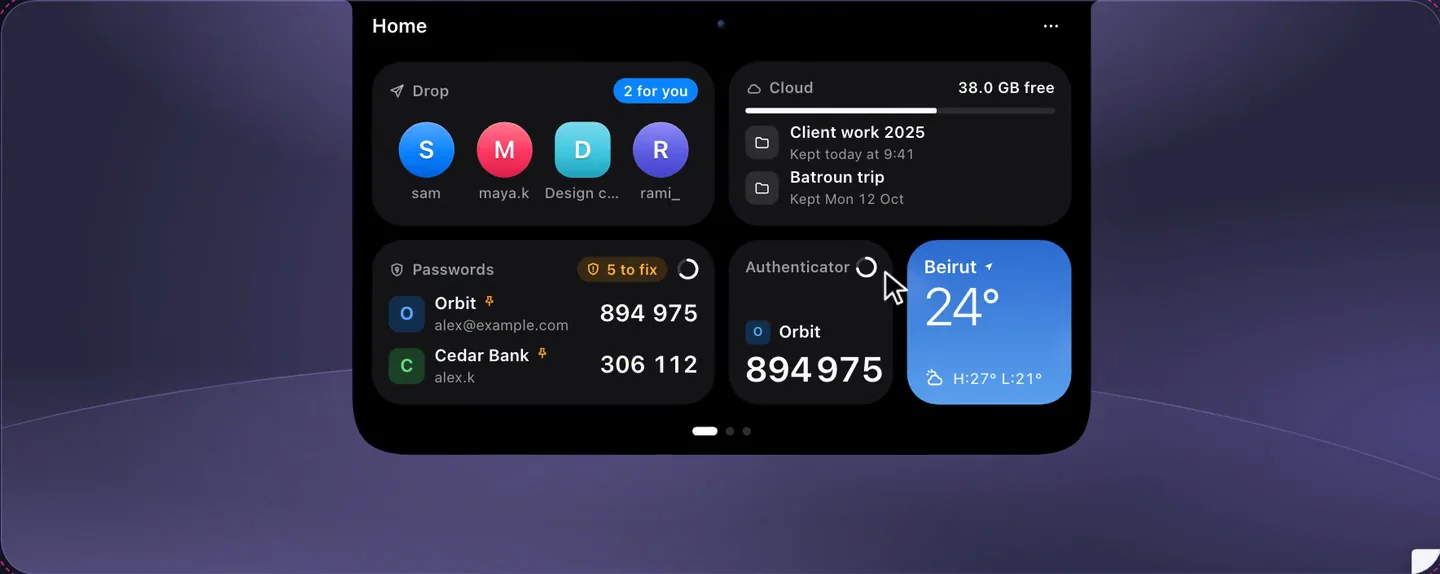
Drawn from the real interface: Crest 4.11's panel, faithfully recreated.
Album art, a real scrubber, synced lyrics, the queue and an output picker. Works across Music, Spotify, Safari and any app macOS reports, with a fallback for when it clamps down.
Drop files onto the notch to park them, capture screenshots straight into it, and search your clipboard history in the same place.
Ask or dictate. It answers, and it can create the reminder, todo or event it just suggested, after you approve it. Uses your own Claude subscription, no API key to paste.
Claude Code and Codex ask permission in the notch. Allow or Deny in one click, over fullscreen apps and on any display, without switching windows. The prompt sticks until you answer.
The next meeting with a one-click Join, a month grid, and adding or editing events that sync wherever your calendar already syncs.
Reminders lists you can tick from the notch, and quick notes that stay where you left them. Minutes files its meeting summaries straight in here.
CPU, memory, disk, network and battery, live and readable at a glance rather than buried in Activity Monitor.
Your SSH connections, saved once and opened from the notch in Terminal, iTerm2 or Ghostty. Keys, ssh-agent, or a password kept in your Keychain, never in a config file.
Real cycle count and capacity, plus the charge level of every connected Bluetooth device, and one-tap audio output switching.
Home, Work and Code layouts that carry their own modules, and an Auto setting that switches by what is actually happening on your Mac.
Start, pause and stop a Take recording from the notch, arm Minutes when a call begins, and see both while they run.
A timer that survives sleep, weather where you are, a notification mirror, and your open pull requests, all in the same panel.
Needs a MacBook with a notch, on macOS 14 Sonoma or later. Light on battery: animations pause on battery and in Low Power Mode. Signed and notarized. See Crest in depth
Screen Studio class staging, native and offline, bought once. A capture is staged the moment it stops, and every part of that staging stays editable as an object on a timeline. The preview you scrub is the file you export.

Drawn from the real interface: the Take editor, where zooms on the timeline are draggable objects, not baked into the picture.
Backdrop, padding, rounded corners, a true shadow, a spring-smoothed cursor and zooms solved from your clicks. Every capture arrives looking edited.
Move a zoom, delete one, change the backdrop or the padding and the canvas updates as you do it. There is no Apply step and no render queue, because the preview and the export run the same compositor.
Size, hide when idle, and a spotlight that dims everything but the pointer. The cursor is redrawn from its own track, not filmed, so it stays crisp at any zoom.
Drag a box over an API key, an email address or a customer name. It follows the timeline and burns into the export, so a demo never leaks what was on screen.
Shortcuts appear as keycaps while you press them. Terminal and editor tutorials stop needing a voice track just to say what you typed.
Dead air is detected and sped up rather than cut, so the video keeps its rhythm. Keep any span you want at full speed with one tap.
A live circular camera you can park in any corner or drag anywhere, recorded to its own file and composited at export. Off by default, because most takes do not want a face.
Your voiceover and the Mac's own output, captured as separate tracks with a live level meter before you roll.
Transcribed by macOS on your Mac and burned in if you want them. No upload, no per-minute charge.
Window capture keeps the cursor and zooms honest even when you move or resize the window mid-take. Area capture picks the right display when you have several.
Record a cabled iPhone inside a real device frame, and reframe any take to vertical with the zooms re-solved rather than cropped.
MP4, ProRes, an animated GIF and a raw passthrough, each with a real size estimate before you commit. No watermark on any of them, on the trial or after.
Takes are .mov files in ~/Movies/Takes with a sidecar next to them. No library database to corrupt, nothing to export out of if you leave.
Pause mid recording and pick it up, or throw the take away and roll again without leaving the strip. A take that started always ends as a playable file.
Runs on any Mac on macOS 14 Sonoma or later, universal for Apple Silicon and Intel. See Take in depth · Take vs Screen Studio
It records both sides of a call, writes the notes with the models already inside macOS, and pulls out what people agreed to. Nothing is uploaded, because nothing needs to be. Turn off your network mid meeting and it keeps working.

Drawn from the real interface: Minutes on a Mac. Summaries are written on device.
Your microphone and the audio your meeting app plays, recorded as two separate channels. Headphones included: it taps the app's output digitally rather than listening to a speaker.
You and them, kept apart by which channel they arrived on, so nothing gets misattributed to the wrong person.
Apple's speech models, already in macOS. No model download, no API key, no per-minute cost, no audio leaving the Mac.
A readable recap plus the decisions that were actually made, written by the model shipped with the OS and grounded in what was said.
"Tuesday at ten" becomes a calendar event and "I'll send the build" becomes a reminder, each one shown to you with an Add button. It revises them live when the plan changes mid call, and never adds anything on its own unless you turn that on.
A recording takes the name of the meeting it belongs to and lists who was there, instead of leaving you with Recording 47.
One folder of plain .md files you own, readable in any editor forever. The catches survive in them, so a saved note stays actionable months later.
Meetings down the left in the order they happened, with a waveform under each one so you can see where the talking was.
Two Lanes, The Record and The Desk. Not colour schemes: three different layouts for the same work, so it matches how you actually read.
Finish a meeting and file its summary straight into Crest's Notes, one tap, no sync and no account.
When a call is about to start, Crest offers to record it. One tap arms Minutes, and the indicator stays visible the whole time it is running.
macOS can starve other apps of the microphone during some VoIP calls. Minutes warns you live if that happens and rebuilds its engine to win the mic back, and the other side records either way.
Needs macOS 26 on Apple Silicon, because the transcription and summarization models ship inside the OS. See Minutes in depth · Minutes vs Granola
The short version, if you only want one.
| Crest | Take | Minutes | |
|---|---|---|---|
| What it is | A control room in the notch | A screen recorder and editor | A meeting notetaker |
| You open it | By glancing up | With a global shortcut | When a call starts |
| Price, once | $19.99 | $24.99 | $29.99 |
| Free tier | Yes, forever | 7 day trial | 7 day trial |
| Needs | macOS 14, a notch | macOS 14, any Mac | macOS 26, Apple Silicon |
| Runs offline | Yes | Yes | Yes |
| Sends anything out | No | No | No |
| What you end up with | Your Mac, more answerable | .mov files in a folder | .md files in a folder |
Every app is a one-time purchase with free updates, and each licence covers 2 Macs. All three together is $49.99, which is $25 less than buying them one at a time.