Codex CLI notifications on a Mac: when it is done and when it needs approval
Codex has two notification switches in ~/.codex/config.toml, and they cover different moments. notify runs a program of yours, but only when a turn ends, so it can never tell you an approval is waiting. tui.notifications covers both, but it speaks through your terminal, so whether you see a banner depends on the terminal. For a banner on any terminal, use notify for done and a PermissionRequest hook for approvals.
Last updated: October 2026
Written by the developer of Crest, 6 October 2026. Tested that day on a 16-inch MacBook Pro with macOS 27.0.1 and Codex CLI 0.160.1. We have no OpenAI account on that Mac, so a local stand-in server played the model; what Codex did around it (hooks, notify, the alerts) is Codex’s own. Crest comes last, and you do not need it.
Which switch catches what
| Moment | notify | tui.notifications | PermissionRequest hook |
|---|---|---|---|
| A turn ends | Yes | Yes (agent-turn-complete) | No |
| An approval is waiting | No | Yes (approval-requested) | Yes |
| Works in any terminal | Yes, it runs your program | No, it sends an escape code | Yes, it runs your program |
| While you look at the terminal | Fires | Silent by default | Fires |
That first column is why people search “codex notify not working”: it is working, it just never fires for an approval. OpenAI’s docs say it supports “currently only” agent-turn-complete, and in our test it did exactly that.
When it is done: the notify program
Save this as ~/.codex/notify.sh. Codex calls it with one JSON argument when a turn ends.
#!/bin/sh
# ~/.codex/notify.sh: Codex passes one JSON argument when a turn ends.
[ "$(printf '%s' "$1" | jq -r '.type')" = "agent-turn-complete" ] || exit 0
# Codex 0.160.1 also reports the short turn that names the session. Skip it.
printf '%s' "$1" | jq -e '."input-messages"[0] // "" | startswith("Generate a concise, single-line task title")' >/dev/null && exit 0
project=$(basename "$(printf '%s' "$1" | jq -r '.cwd')")
title="Codex is done: $project"
text=$(printf '%s' "$1" | jq -r '."last-assistant-message" // "Turn complete" | .[0:120]')
osascript -e 'on run argv' \
  -e 'display notification (item 2 of argv) with title (item 1 of argv) sound name "Glass"' \
  -e 'end run' "$title" "$text"
Then add this to ~/.codex/config.toml, with your own home folder in the path, because notify is a list of arguments and nothing expands ~ in it. It has to be at the top level of the file, above any [table], and in your own config: Codex ignores notify in a project’s .codex/config.toml.
# ~/.codex/config.toml (top level, before any [table])
notify = ["sh", "/Users/you/.codex/notify.sh"]

[tui]
notifications = ["agent-turn-complete", "approval-requested"]
One quirk we hit: in the interactive Codex, the first prompt of a session fired notify twice. The extra one is the short turn where Codex writes the session’s title, and its message starts with “Generate a concise, single-line task title”. The script above skips it, so you get one banner per real turn.
When it needs approval: a PermissionRequest hook
Codex runs a PermissionRequest hook the moment it is about to ask you. A hook that prints nothing decides nothing, and Codex shows its normal prompt, so this one only adds a banner. Save it as ~/.codex/approval-notify.sh:
#!/bin/sh
# ~/.codex/approval-notify.sh: a banner when Codex asks. It decides nothing:
# printing nothing leaves Codex's own approval prompt in place.
input=$(cat)
project=$(basename "$(printf '%s' "$input" | jq -r '.cwd // empty')")
title="Codex needs your approval: $project"
text=$(printf '%s' "$input" | jq -r '.tool_input.command // .tool_name | tostring | .[0:120]')
osascript -e 'on run argv' \
  -e 'display notification (item 2 of argv) with title (item 1 of argv) sound name "Glass"' \
  -e 'end run' "$title" "$text" >/dev/null 2>&1
exit 0
And register it in ~/.codex/hooks.json:
{
  "hooks": {
    "PermissionRequest": [
      {
        "hooks": [
          { "type": "command", "command": "sh /Users/you/.codex/approval-notify.sh", "timeout": 10 }
        ]
      }
    ]
  }
}
Codex will not run a new hook until you have looked at it. At the next start it warns that a hook needs review; type /hooks, read the entry and trust it. Change that entry and it asks again. (For our throwaway test we started Codex with --dangerously-bypass-hook-trust instead, which skips that review for one run; do not make it a habit.) If nothing fires at all, check that your config.toml does not set hooks = false under [features].


Both banners from Codex CLI 0.160.1 on macOS 27. The first from the PermissionRequest hook the moment Codex asked; the second from notify when the turn ended. api-server is the test folder’s name. The replies came from a stand-in model server (see Sources); the hooks, the prompt and the timing were Codex’s own.
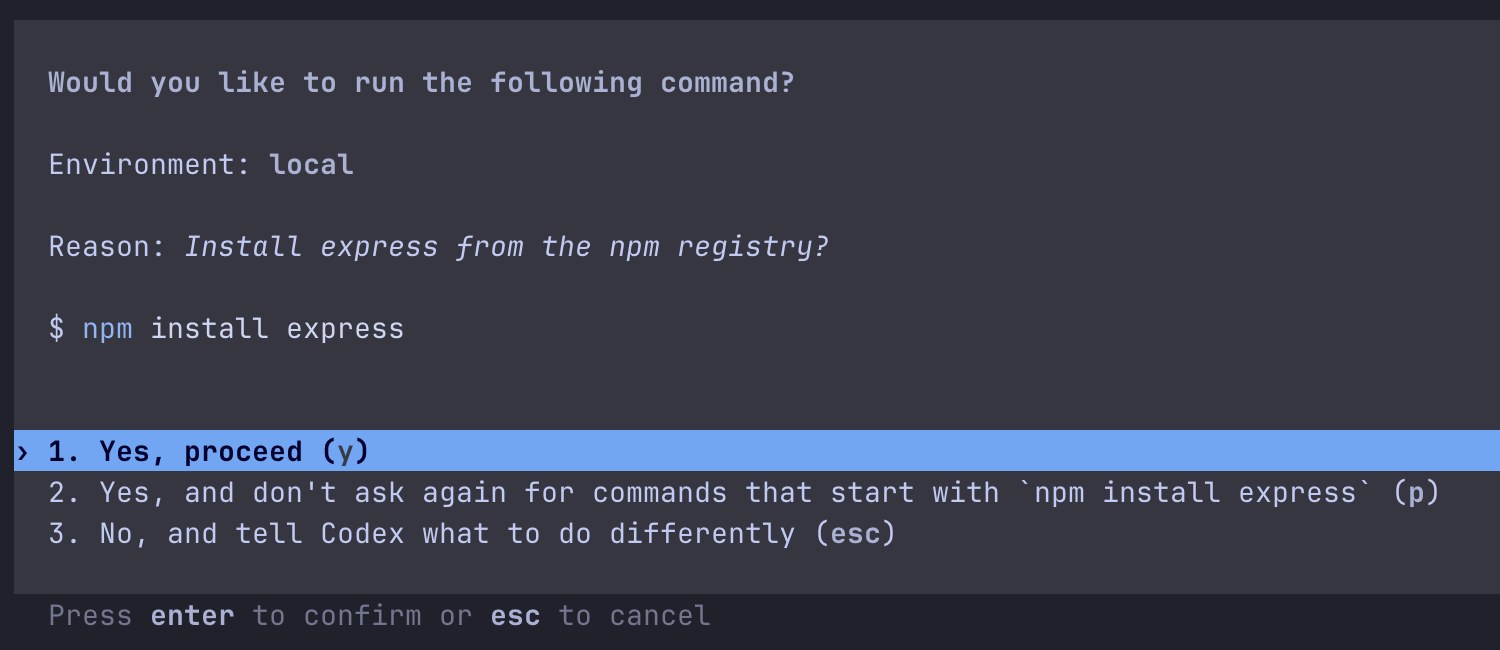
The prompt your banner is about. Codex 0.160.1 waiting on an approval in our test. Answer 2 (p) saves a rule so the same command never asks again.
Codex’s own alert, terminal by terminal
tui.notifications = true turns on Codex’s built-in alerts for both moments; the list form in the config above does the same and names them. They go out through the terminal, and we recorded what Codex sent under each terminal type:
| Terminal | What tui.notifications sent | Becomes a banner? |
|---|---|---|
| Ghostty, iTerm2, Warp, an unknown terminal | OSC 9 with the text, for example “Approval requested: /bin/zsh -lc 'touch ../outs...” | Only where the terminal turns OSC 9 into a notification and may post one |
| Terminal.app, the VS Code terminal | A plain bell | No |
| Any terminal you are looking at | Nothing (the default condition is unfocused) | No |
So in Terminal.app you get a bell at most, and in Ghostty or iTerm2 you get a banner only if that terminal is allowed to post notifications (in our test, Ghostty received the escape and showed nothing, which points at its notification permission). Set notification_condition = "always" under [tui] if you want the alert even while you are looking at the terminal.
Or answer it on the notch
Crest, a Mac notch app, shows a Codex approval on the notch the moment it arrives: the command, Deny and Allow, on every display, and one click back to the terminal. It hooks into the same PermissionRequest event, so it needs the same one-time trust in /hooks.

A Codex request on Crest’s notch. The pill names the agent and the command; rest the pointer on it for Deny and Allow.
- A chime and a macOS banner, “Codex is waiting on you”, come with each request. Both are on by default, each with a switch in Settings > Coding agents.
- When a turn ends, Crest posts no banner. Keep
notifyfor that. With Crest Pro, the Agents widget shows the session as Finished, with how long ago.
- Download Crest. Signed and notarized.Free tier, no account · 7-day Pro trial, no card · macOS 14 or later
- Open Crest’s Settings, go to Coding agents and turn on “Allow or deny commands here”. Then start Codex, open
/hooksand trust Crest’s entry, once.
Answering from the notch is free and needs no account. Crest Pro adds the Agents widget; Pro, with Take and Minutes, is $24.99 once or $2.99 a month. The full Codex side is on Codex approvals in the notch. Claude Code has its own hooks for the same two moments: Claude Code notifications on Mac. And if Codex asks too often in the first place, see how to make the agents ask less.
Sources
- OpenAI, Codex docs, Advanced configuration. Read 6 October 2026.
notifyfires “currently only” onagent-turn-complete, its JSON fields, andtui.notifications,tui.notification_methodandtui.notification_condition;notifyis ignored in a project’s own.codex/config.toml. - OpenAI, Codex docs, Configuration reference. Read 6 October 2026. The types and defaults of the same keys.
- OpenAI, Codex docs, Hooks. Read 6 October 2026.
PermissionRequest, the hooks.json shape, the one-time review in/hooks, and--dangerously-bypass-hook-trust. - Our own runs, 6 October 2026, on a 16-inch MacBook Pro with macOS 27.0.1 and Codex CLI 0.160.1, with Codex’s config in a throwaway folder. We have no OpenAI account on this Mac, so a small local server stood in for the model and returned scripted replies (one command needing approval, then a closing message). The hooks, notify, the escape sequences per terminal type and both banners above are Codex’s own behaviour.
- Crest source, read 6 October 2026: CodexHook.swift, ApprovalNotifier.swift, SettingsCatalog.swift, AgentSessionsReading.swift.
FAQ
Why is my Codex notify not working for approvals?
Because notify only fires when a turn ends (agent-turn-complete). It never runs for an approval. For approvals, turn on tui.notifications, which includes approval-requested, or add a PermissionRequest hook that posts a banner, as this page shows.
How do I get a notification when Codex is done?
Set notify = ["sh", "/Users/you/.codex/notify.sh"] at the top level of ~/.codex/config.toml, with a script that runs osascript to show a banner. Codex calls it with one JSON argument whose type is agent-turn-complete and which includes the last assistant message and the folder.
Does tui.notifications show a macOS notification?
Only through your terminal. Codex sends an OSC 9 escape in terminals such as Ghostty, iTerm2 and Warp, and a plain bell in Terminal.app and the VS Code terminal. Whether that becomes a banner is up to the terminal and its notification permission. By default it stays silent while the terminal is focused.
Can Codex play a sound when it finishes?
Yes, from your notify program: the osascript line on this page adds sound name "Glass", or run afplay /System/Library/Sounds/Glass.aiff.
Why does my Codex hook not run?
Codex runs no new or changed hook until you review and trust it in /hooks; at startup it warns that a hook needs review. Also check that [features] hooks = false is not in your config.toml.
Do I need Crest for this?
No. Everything above is Codex and macOS. Crest is for answering the approval from the notch instead of the terminal, which is free.
Try Crest free
Download it with no account. Now Playing, the Shelf, the Clipboard and window snapping are free for good, and signing in gives you 7 days of Pro with no card. Pro, with Take and Minutes, is $24.99 once, on 2 Macs, or $2.99 a month.
Download Crest for macOS Get Crest Pro, $24.99Free forever. Pro free for 7 days, no card needed.
macOS 14 Sonoma or later · signed and notarized by Apple · 7-day refund
Keep reading: Claude Code notifications on Mac · Make the agents ask less · Codex approvals in the notch · Notch apps for AI agents · Facts and prices · Crest overview