Crest for your team, paid once.
Every person gets Crest Pro, Take and Minutes on their own work email and their own two Macs. You buy seats for 5 to 50 people in one payment, hand them out from your account page, and move them when people come and go. No monthly seat bill, nothing to host, and your recordings, calls and code never reach our servers.
- 5 to 50 people
- from $12 a person, once
- invoices with your VAT number
- 7-day refund
Teams that live on Macs and want the tools to stay on them.
A seat is everything we make, so one purchase covers the engineer, the person who records the demo and the one who is in calls all day.
People who run coding agents
Claude Code, Codex and GitHub Copilot CLI permission prompts land on the notch with Allow and Deny, so a run never sits waiting in a tab nobody is looking at. How it works
People who record demos and walkthroughs
Take records the screen, the camera and the voice, then stages it with zooms and captions into a finished video, with no watermark and nothing uploaded. About Take
People whose calls cannot go to a cloud
Minutes records Zoom, Teams or Meet from the Mac, with no bot joining, and transcribes and summarizes on the Mac itself. The audio and the notes never leave it. About Minutes
The person who has to sign it off
One payment, one invoice with your company's details, seats you can see and take back, and a short, exact list of what the apps send. Nothing to install on a server and no admin console to learn.
One payment for everyone.
The price per person drops as the team grows. Every total ends in .99, tax included, and a team never costs more than a bigger one.
| People | Total, once | Why |
|---|---|---|
| 5 | $79.99 | $16 a person, from 5 to 9 people |
| 8 | $127.99 | $16 a person |
| 9 | $139.99 | The same as 10, so the tenth person is free |
| 10 | $139.99 | $14 a person, from 10 to 24 people |
| 15 | $209.99 | $14 a person |
| 22 to 24 | $299.99 | The same as 25, so make it 25 |
| 25 | $299.99 | $12 a person, from 25 to 50 people |
| 50 | $599.99 | The most you can buy here. More? Talk to us |
In short: $16 a person for 5 to 9, $14 for 10 to 24 and $12 for 25 to 50, so 5 people are $79.99, 10 are $139.99, 25 are $299.99 and 50 are $599.99. Paid through Paddle; crypto is not offered for teams. No discount codes apply to a team.
For a team
Everything: Crest Pro, Take and Minutes for each person, on their own email and their own 2 Macs.
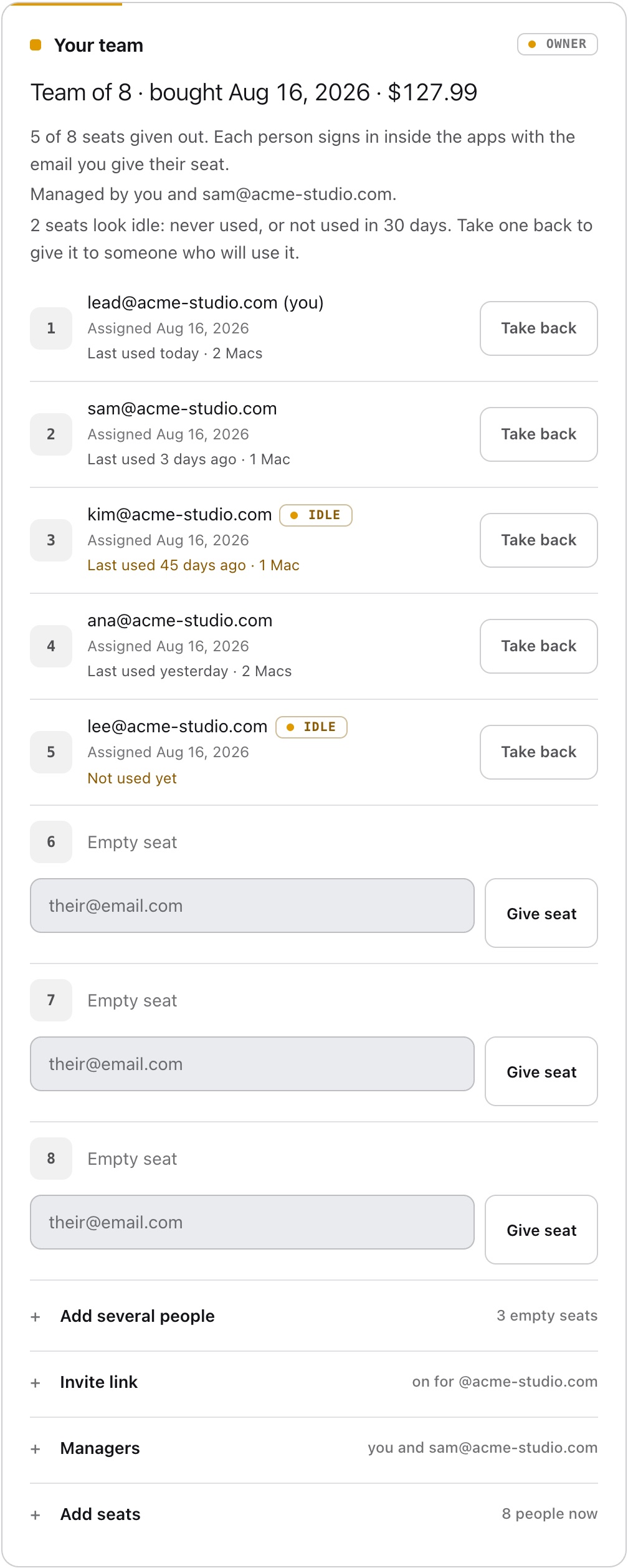
One payment for everyone. You hand out the seats from your account, seat 1 is yours, and you can move a seat to someone else any time.
You hand out the seats. People sign in. That is the whole rollout.
A seat is one person, on their own email. There are no licence keys to send around: each app unlocks when its person signs in.
- Buy for the team. Pick 5 to 50 people and pay once. The email you pay with becomes the team's owner, and seat 1 is yours.
- Give out the seats from your account page: type one email per seat, paste a whole list at once, or turn on an invite link for your company's email domain and share it. Only addresses at that domain can use the link, and free email domains such as Gmail or Outlook can never be a team domain.
- Each person signs in inside Crest, Take and Minutes with the email on their seat, and everything unlocks, on up to two Macs each.
- One manager besides you. They give and take back seats and run the invite link from their own account. Only you, the owner, add seats or choose the manager.
- See which seats are used. Each seat shows when it was last used and on how many Macs, and seats nobody has used in 30 days are marked, so you can take them back.
- Take a seat back any time. The person loses Crest Pro, Take and Minutes, their Macs are signed out, and the seat is empty for the next person. Every move is logged.
- Add seats later, up to 50. You pay the difference between the two team prices: going from 8 to 12 people is $40.00, the price of 12 minus the price of 8.
- Refunds work like every purchase: 7 days, and a refunded team takes back every seat.
An invoice your finance team can file.
Paddle is our reseller and merchant of record, so Paddle is the seller on the invoice and charges the tax your country requires. In the checkout, use Add tax number to enter your company name, address and VAT or tax number, and they are printed on the invoice. Every invoice, for the team and for seats added later, can be downloaded again from your account page whenever you need it. Need a purchase order number on it, or a detail changed? Email [email protected].
The exact list, for your security review.
The apps run on the Mac and send no analytics. This is everything they send to us, and what never leaves. The full list, including the services a module reaches straight from the Mac, is in the privacy policy.
Signing in and the licence
When a person signs in inside an app, it sends their account sign-in, the Mac's hardware identifier and the Mac's name, so the licence is bound to that Mac and the Mac appears on their account page. Every few days the app sends its signed licence back to be renewed. The identifier is how the two-Mac limit and seat usage work, and it is used for nothing else.
Updates and offers
Each app checks our update feed for a new version. Crest also asks our server twice a day whether a sale is on. Neither sends anything about what a person does in the app.
Recordings, calls and notes
Take's recordings are ordinary movie files in the person's Movies folder. Minutes records, transcribes and summarizes on the Mac with Apple's on-device models, and the audio, transcripts and summaries never leave it. Crest's modules run locally.
Coding agent prompts
Claude Code, Codex and Copilot CLI permission prompts are answered on the Mac: the command, the file and the answer go between the agent's hook and Crest, and never to us. Crest's co-pilot talks to Claude through the person's own Claude Code, or the AI service and key they set.
Team rules and an approval log
Next for teams: always-allow and never-allow rules for coding agents, set by the manager and applied on every teammate's notch, and an approval log. The log will record outcomes only: who, when, which agent, the project folder's name, the kind of action (run, edit, fetch or other), allowed or denied, and whether a person, a team rule or session trust decided. Never the command, the file path or the URL.
Your account page
Seat usage on the account page comes from the licence check-ins above: when a seat's Macs last checked in and how many there are. Nothing else about a person's day is recorded.
Install it the way you install everything else.
Signed and notarized by Apple, so macOS opens them with no warnings. Each app updates itself, and updates are free.
Download links that stay put
crestnotch.app/download is always the newest Crest, crestnotch.app/take/download is Take and crestnotch.app/minutes/download is Minutes, each a signed disk image you can hand to your deployment tool.
Homebrew
Crest is a Homebrew cask in our own tap:
brew install --cask zack40x/crest/crestTake and Minutes install from their download links.
Sign in with the seat email
Each person opens the app and signs in with the email on their seat. That is what unlocks it: there is no key to paste. Crest and Take need macOS 14 or later; Minutes needs macOS 26 or later on Apple Silicon.
Good to know.
Is it a subscription?
No. You pay once for the number of people you pick, from 5 to 50, and the seats are yours with free updates. Nothing renews. Adding seats later is one more payment for the difference.
What happens when someone leaves?
Take their seat back from your account page. They lose Crest Pro, Take and Minutes, their Macs are signed out, and the seat is empty for the next person.
Do the apps send our recordings, notes or commands anywhere?
No. Take's recordings and Minutes' audio, transcripts and summaries stay on the Mac, and the apps send no analytics. They go online to sign in, check the licence every few days and look for updates. Coding agent approvals are answered on the Mac and never reach us.
Can we get an invoice with our company name and VAT number?
Yes. Paddle, our reseller and merchant of record, issues the invoice. Use Add tax number in the checkout to enter your company name, address and VAT or tax number, and they are printed on it. Every invoice can be downloaded again from your account page.
What if we are more than 50 people?
Email [email protected] with how many people and we set the team up with you. The same address takes security questionnaires and questions before you buy.
More than 50 people, or a question first?
Bigger teams, an invoice before you pay, a security questionnaire or a call with your IT team: write to [email protected]. One developer makes these apps, and he answers.
[email protected] · signed and notarized by Apple · payments by Paddle