Get a Mac notification when Claude Code is done or needs you
Add two hooks to ~/.claude/settings.json. A Notification hook runs when Claude Code is waiting on a permission prompt, and a Stop hook runs the moment it finishes a turn. Point both at osascript and macOS shows a banner. Claude Code’s own alert covers only the waiting, only in some terminals, so the hooks are the dependable route.
Last updated: October 2026
Written by the developer of Crest, 6 October 2026. Every step was run that day on a 16-inch MacBook Pro with macOS 27.0.1 and Claude Code 2.1.288; the times below come from the hooks’ own log. Crest comes last, and you do not need it for any of this.
The two hooks
Open ~/.claude/settings.json (create it if it is not there) and add this. If the file already has a hooks key, add the two events inside it rather than a second hooks.
{
  "hooks": {
    "Notification": [
      {
        "matcher": "permission_prompt",
        "hooks": [
          { "type": "command", "command": "osascript -e 'display notification \"Claude Code needs you\" with title \"Claude Code\"'" }
        ]
      }
    ],
    "Stop": [
      {
        "hooks": [
          { "type": "command", "command": "osascript -e 'display notification \"Claude Code is done\" with title \"Claude Code\" sound name \"Glass\"'" }
        ]
      }
    ]
  }
}
Restart Claude Code, or type /hooks to see both listed. The first banner appears when Claude stops to ask you something and you have not typed for six seconds. The second appears every time Claude finishes, with a sound.
Put the same block in a project’s .claude/settings.json instead if you only want it there.
What fires when, measured
We ran a real session that asked for permission once and then finished, and logged every hook with its time.
| What happens | Hook that fires | When it fired in our test | Claude Code’s own alert |
|---|---|---|---|
| Claude asks to run a command | Notification, type permission_prompt | 6 seconds after the prompt appeared, as long as nobody typed | Yes, in Ghostty, iTerm2 and Kitty |
| Claude finishes its turn | Stop | About 2 seconds after its last action, as the turn ended | No |
| You have not come back | Notification, type idle_prompt | 60 seconds after the turn ended | Yes, in Ghostty, iTerm2 and Kitty |
Two things that table explains. A notification that shows up a minute late is idle_prompt: it is a reminder, not a finish signal, which is why the config above uses Stop for finishing and leaves idle_prompt out with "matcher": "permission_prompt". In our run that matcher kept the 60-second reminder away. And any keystroke resets the six seconds, so you get no banner while you are typing in that terminal.
Stop also fires in claude -p runs, so a script that runs Claude Code headless gets its done banner too.
A banner that names the project
With three sessions open, “Claude Code needs you” does not say which. The hook gets the session’s details as JSON on standard input, including the folder (cwd) and, for Stop, Claude’s last message. Save this as ~/.claude/hooks/notify.sh:
#!/bin/sh
# ~/.claude/hooks/notify.sh: a macOS banner that names the project.
# Claude Code sends the hook's details as JSON on stdin.
# jq and osascript both ship with macOS.
input=$(cat)
project=$(basename "$(printf '%s' "$input" | jq -r '.cwd // empty')")
case "$(printf '%s' "$input" | jq -r '.hook_event_name')" in
  Stop) title="Claude Code is done: $project"
        text=$(printf '%s' "$input" | jq -r '.last_assistant_message // "Finished" | .[0:120]') ;;
  *)    title="Claude Code needs you: $project"
        text=$(printf '%s' "$input" | jq -r '.message // "Needs your attention"') ;;
esac
osascript -e 'on run argv' \
  -e 'display notification (item 2 of argv) with title (item 1 of argv) sound name "Glass"' \
  -e 'end run' "$title" "$text"
Then point both hooks at it:
{
  "hooks": {
    "Notification": [
      { "matcher": "permission_prompt",
        "hooks": [{ "type": "command", "command": "sh ~/.claude/hooks/notify.sh" }] }
    ],
    "Stop": [
      { "hooks": [{ "type": "command", "command": "sh ~/.claude/hooks/notify.sh" }] }
    ]
  }
}
The text goes to osascript as arguments, not pasted into the script, so a message with quotes in it cannot break the command.

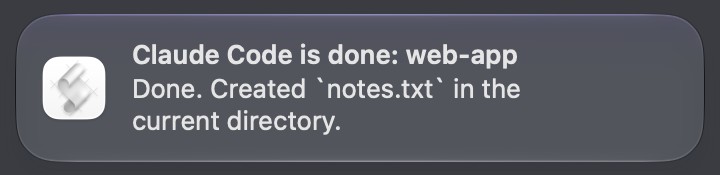
The two banners from a real Claude Code 2.1.288 session on macOS 27. The first came from the Notification hook six seconds after the permission prompt appeared; the second from the Stop hook when the turn ended. web-app is the test folder's name. The icon is Script Editor's, because osascript posts through it.
Claude Code’s own alert, terminal by terminal
Claude Code also alerts by itself when it is waiting, through your terminal. We recorded exactly what it sent under each terminal type:
| Terminal | What Claude Code sent it | What to do |
|---|---|---|
| Ghostty | A desktop notification escape (OSC 777) with the message | Nothing, if Ghostty may post notifications |
| iTerm2 | A notification escape (OSC 9) with the message | Profiles > Terminal: Notification Center Alerts, then Filter Alerts: escape sequence alerts |
| Kitty | A desktop notification, per Anthropic’s docs (not tested here) | Nothing |
| Terminal.app | Nothing, with the audible bell on (the default) | Set preferredNotifChannel to terminal_bell for a bell, or use the hooks |
| Warp, VS Code and Cursor terminals | Nothing | Use the hooks |
Two limits. It never alerts when Claude finishes; it alerts at the permission prompt and again 60 seconds after the finish. And it only becomes a banner if the terminal turns it into one: in our test, Ghostty received the escape but no banner appeared, so check that the terminal is allowed in System Settings > Notifications. The hooks do not depend on the terminal at all, which is why this page leads with them. Hooks and the built-in alert run side by side.
Inside tmux, add set -g allow-passthrough on to ~/.tmux.conf or the built-in alert never reaches the outer terminal.
If no banner shows up
- Script Editor is not allowed to notify.
osascriptposts as Script Editor, and without permission it fails silently. Runosascript -e 'display notification "test"'once in Terminal, then open System Settings > Notifications > Script Editor and turn on Allow notifications. - A Focus is on. Do Not Disturb hides banners; they wait in Notification Center.
- The JSON is broken.
jq . ~/.claude/settings.jsonprints it back if it parses, and an error with a line number if not./hooksin Claude Code shows what it loaded. - You were typing. The
permission_promptnotice waits for six quiet seconds.Stopdoes not wait. - You are on SSH. Hooks run where Claude Code runs, so
osascripton a Linux server does nothing. The built-in terminal alert travels back over SSH to Ghostty and Kitty, and to iTerm2 with its alert setting on.
Or answer it where you are
A banner tells you to go back to the terminal. Crest, a Mac notch app, puts the request itself on the notch: which agent, the command, and Deny and Allow, on every display. It arrives the moment Claude asks, not six seconds later, because Crest’s hook runs before the prompt, and Claude’s questions come with their answers to tap.

The same moment on Crest’s notch. The pill names the agent and the command the moment Claude asks.
- A chime and a macOS banner, “Claude is waiting on you”, come with it. Both are on by default, each with a switch in Settings > Coding agents.
- Which session: with Crest Pro, the Agents widget lists every session as Waiting for you, working, or Finished 4 min ago, and one click takes you to its terminal.
- What it does not do: Crest posts no banner when Claude finishes. Keep the
Stophook above for that; the two work side by side. - Permission prompts reach the notch from Manual mode sessions. In auto mode, Claude Code’s default since 2.1.283, a classifier answers most commands for you, and the notch still gets Claude’s questions.
- Download Crest. Signed and notarized.Free tier, no account · 7-day Pro trial, no card · macOS 14 or later
- Open Crest’s Settings, go to Coding agents and turn on “Allow or deny commands here” and “Answer Claude’s questions here”.
Answering from the notch is free and needs no account. Crest Pro adds the Agents widget; Pro, with Take and Minutes, is $24.99 once or $2.99 a month. More on the notch side: Claude Code in the notch. Running agents beyond Claude Code and Codex? Crest vs Vibe Island compares an app that follows thirty of them. Codex has its own notification switches: Codex CLI notifications on Mac. And if the problem is how often Claude asks, see how to make the agents ask less.
Sources
- Anthropic, Claude Code docs, Automate actions with hooks. Read 6 October 2026. The macOS
Notificationhook withosascript, and the note that a missing Script Editor permission makes it fail silently. - Anthropic, Claude Code docs, Hooks reference. Read 6 October 2026. When
permission_prompt(about six seconds) andidle_prompt(about 60 seconds) fire, that each keystroke defers them, and theStopevent withlast_assistant_message. - Anthropic, Claude Code docs, Configure your terminal and the settings reference. Read 6 October 2026. Which terminals get a desktop notification,
preferredNotifChanneland its values, iTerm2’s alert settings, tmux passthrough. - Our own runs, 6 October 2026, on a 16-inch MacBook Pro with macOS 27.0.1 and Claude Code 2.1.288, in throwaway folders: hook timings from the hooks’ own log, the built-in alert recorded byte for byte per terminal type, and the two banners above.
- Crest source, read 6 October 2026: ApprovalHook.swift, ApprovalNotifier.swift, SettingsCatalog.swift, AgentSessionsReading.swift.
FAQ
How do I get a notification when Claude Code finishes?
Add a Stop hook to ~/.claude/settings.json that runs osascript -e 'display notification "Claude Code is done" with title "Claude Code"'. Stop runs every time Claude finishes a turn; in our test it fired about two seconds after Claude's last action. Claude Code's own terminal alert does not fire on finishing.
Why does my Claude Code notification arrive a minute late?
Because it is the idle_prompt notification, which Claude Code sends about 60 seconds after it finishes if you have not typed since. For an alert at the moment it finishes, use the Stop hook, and set the Notification hook's matcher to permission_prompt so the late reminder stays away.
Why does no notification appear on my Mac?
Most often Script Editor is not allowed to post notifications: osascript posts as Script Editor and fails silently without permission. Run osascript -e 'display notification "test"' once, then turn on Allow notifications for Script Editor in System Settings > Notifications. Also check Focus, and that ~/.claude/settings.json is valid JSON (jq . prints it back).
Can Claude Code play a sound when it needs input?
Yes. Add sound name "Glass" to the osascript display notification line, or make the hook command afplay /System/Library/Sounds/Glass.aiff for a sound with no banner.
How do I see which Claude Code session needs me?
The hook receives the session's folder as cwd in its JSON input, so a small script can put the folder name in the banner's title, as the notify.sh on this page does. Crest Pro's Agents widget also lists every session with its state and jumps to its terminal.
Does Claude Code notify on its own without hooks?
Yes, in Ghostty, iTerm2 and Kitty: it sends a terminal notification when a permission prompt waits and when it has been idle for about a minute. In Terminal.app it rings the bell only if you set preferredNotifChannel to terminal_bell. It never sends one when it finishes.
Do I need Crest for this?
No. The hooks on this page are all Claude Code and macOS. Crest is for answering the prompt from the notch instead of switching to the terminal, which is free.
Try Crest free
Download it with no account. Now Playing, the Shelf, the Clipboard and window snapping are free for good, and signing in gives you 7 days of Pro with no card. Pro, with Take and Minutes, is $24.99 once, on 2 Macs, or $2.99 a month.
Download Crest for macOS Get Crest Pro, $24.99Free forever. Pro free for 7 days, no card needed.
macOS 14 Sonoma or later · signed and notarized by Apple · 7-day refund
Keep reading: Codex CLI notifications on Mac · Make the agents ask less · Claude Code in the notch · Notch apps for AI agents · Facts and prices · Crest overview