Why Claude Code and Codex keep asking for permission, and how to make them ask less
They ask because they are built to stop before anything that changes your machine: a shell command, a file edit, a network call. The fix that keeps you safe is an allow list: name the commands you run every day (your tests, your build, your commits) and let those through, while everything else still asks. Each agent has one, and below is the exact config for each, tested on this Mac. The switches that skip every check exist too, and this page says plainly what they cost.
Last updated: October 2026
Written by the developer of Crest, 6 October 2026. Every rule here was run that day on macOS 27.0.1 with Claude Code 2.1.288, Codex CLI 0.160.1 and GitHub Copilot CLI 1.0.88, in throwaway folders. Crest comes last.
Why it keeps asking
- Claude Code in Manual mode (the status bar says
⏸ manual mode on) asks before every shell command that is not read-only and before edits. Since version 2.1.283 new terminal sessions start in auto mode instead, where a second model reviews each action and most never reach you. If you are asked constantly, check the status bar: adefaultModein your settings may be holding you in Manual, or auto mode may have fallen back to asking after it blocked 3 actions in a row or 20 in a session. - Codex runs commands in a sandbox and asks when one needs to leave it: network access, or writing outside the project. In a folder that is not a git repository it suggests a read-only sandbox, so every write asks. That is the usual answer to “why is Codex asking for permission all the time”.
- Copilot CLI in its default manual mode asks before commands and file writes, and runs read-only ones without asking.
Claude Code: allow the commands you trust
Put rules in ~/.claude/settings.json for every project, or in a project’s .claude/settings.local.json for that one:
{
  "permissions": {
    "allow": ["Bash(npm run *)", "Bash(npm test *)", "Bash(git commit *)"],
    "deny": ["Bash(git push *)", "Bash(rm *)"]
  }
}
Rules are checked deny first, then ask, then allow, so git push stays refused even if you later add a broader allow rule such as Bash(git *). We ran three commands against rules like these in claude -p: touch a.txt (allowed) ran, mkdir sub (no rule) was held for approval, and rm a.txt hit the deny rule.
- “Yes, and don’t ask again” writes the rule for you. In our session, choosing it on
npm view express versionwroteBash(npm view *)into.claude/settings.local.json. Edit that file to tidy what builds up. - Put the
*after the subcommand.Bash(git log *)allows onlygit log;Bash(git *)allows every git command, push included. - A rule matches text, not intent.
Bash(git push *)does not catchgit -C . push, andBash(rm *)does not catch/bin/rm. Treat deny rules as guard rails, not a lock. - A shared project’s
.claude/settings.jsonallow rules wait for you. They apply only after you accept that folder’s trust dialog, and never inclaude -p. We saw exactly this: the same allow rules did nothing in-pfrom settings.json and worked from settings.local.json.
For file edits, acceptEdits mode (Shift+Tab) lets edits and simple file commands through while shell commands still ask.
Codex: rules for the commands you trust
Codex reads .rules files from ~/.codex/rules/. A prefix_rule matches the start of a command and allows it, prompts for it or forbids it:
# ~/.codex/rules/default.rules
prefix_rule(pattern = ["npm", ["test", "install"]], decision = "allow")
prefix_rule(pattern = ["git", "push"], decision = "prompt")
prefix_rule(pattern = ["rm", "-rf"], decision = "forbidden",
            justification = "Delete files one by one, or ask me.")
Restart Codex after editing. You can test a file without running Codex at all, with codex execpolicy check --rules ~/.codex/rules/default.rules -- npm test. Here is what that returned for us:
| Command | What the rules decided |
|---|---|
npm test | allow |
npm install express | allow |
git push origin main | prompt |
rm -rf build | forbidden |
npm publish | no rule matched, so the normal approval flow |
git -C . push | no rule matched: the prefix is git -C, not git push |
rm -r -f build | no rule matched: -r -f is not -rf |
The last two rows are the same lesson as Claude Code’s: a prefix is text. OpenAI’s rules page adds that when a plain chain like npm test && rm -rf build arrives inside one bash -lc, Codex splits it and the strictest answer wins. execpolicy check does not do that split (we tried), so test each part on its own.
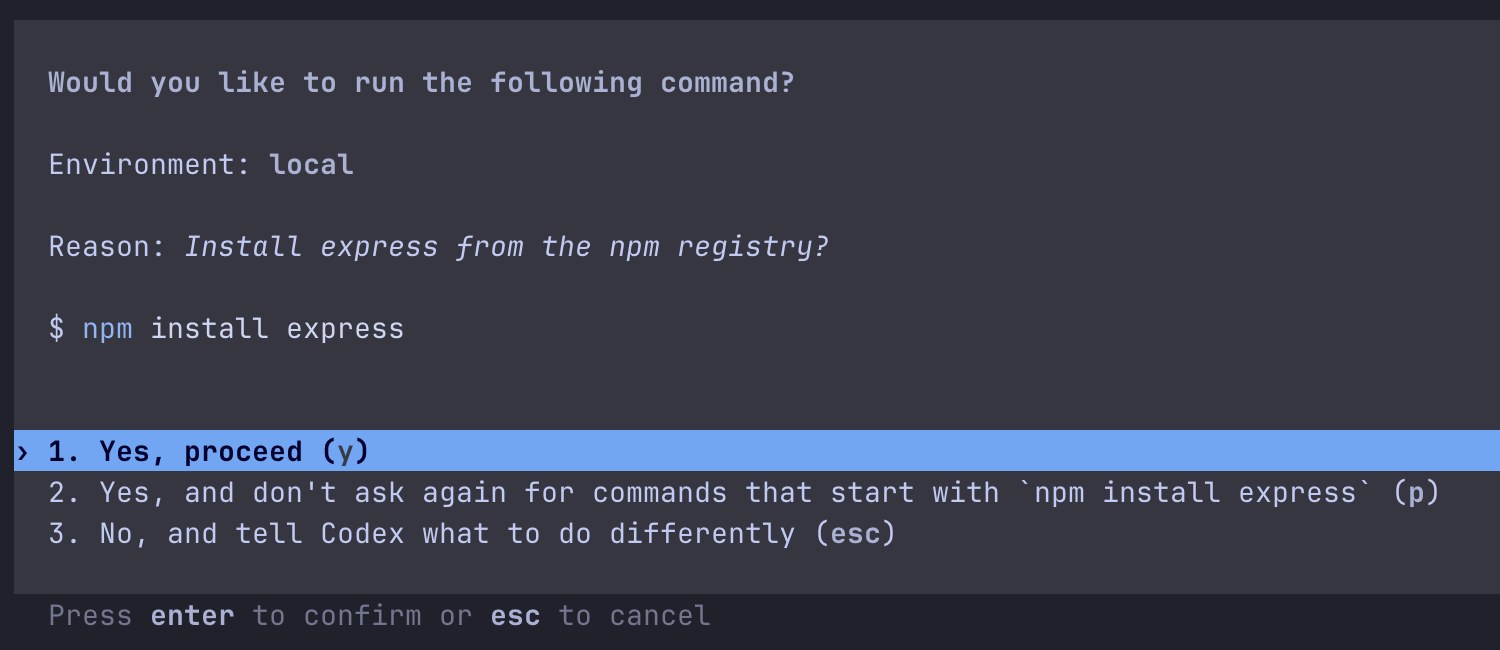
Codex 0.160.1 asking in our test. Answer 2 wrote prefix_rule(pattern=["npm", "install", "express"], decision="allow") to the rules file, so the next npm install express ran without asking.
Two more levers. Run Codex in a git repository, where it defaults to writing inside the project without asking. And approvals_reviewer = "auto_review" in config.toml routes approvals to a reviewer model first, which lets low-risk ones through, denies critical ones and costs extra model calls.
Copilot CLI: allow flags
Copilot takes rules as flags, as kind(argument) patterns:
copilot --allow-tool 'shell(npm test)' --allow-tool 'shell(git:*)' --deny-tool 'shell(git push)'Deny always beats allow, even --allow-all-tools. shell(git:*) covers every git subcommand; Copilot approves git and gh per first subcommand, so shell(git push) names exactly one. We ran copilot -p with --allow-tool 'shell(touch)': touch ran, and rm was refused with “Permission denied and could not request permission from user”. To make a mode stick, copilot help config lists defaultPermissionMode: manual, the experimental assisted (a model approves what it judges safe), or allow-all.
The skip-everything switches, and what they cost
Every agent has a switch that stops all asking. They are real, they are documented, and none of them should be your default.
| Agent | The ask-nothing switch | What it turns off |
|---|---|---|
| Claude Code | --dangerously-skip-permissions, or --permission-mode bypassPermissions | Every permission prompt and safety check except deny rules, explicit ask rules and deleting critical paths such as rm -rf ~. Allow rules stop mattering. |
| Codex | --dangerously-bypass-approvals-and-sandbox (alias --yolo) | Approvals and the sandbox, so commands run with your full access and network. OpenAI’s table calls it Elevated Risk, not recommended. |
| Codex | approval_policy = "never" (-a never) | Approvals only. The sandbox you chose still holds, so with workspace-write it fails rather than asks. |
| Copilot CLI | --allow-all or --yolo | Tool, path and URL checks: --allow-all-tools --allow-all-paths --allow-all-urls together. |
Here is the risk in plain words. With the checks off, the agent does whatever the model decides, and the model can be wrong or misled. A README, an issue or a web page it reads can carry instructions (prompt injection), and with no prompt there is no moment where you see curl ... | sh, a git push --force or an rm -rf before it runs. Anthropic says to use bypass mode only in containers or VMs, and that it “offers no protection against prompt injection or unintended actions”. OpenAI labels Codex’s full-access flag Elevated Risk. If you want an unattended run, give it a container or a VM with nothing in it you would mind losing, and keep the allow lists above for your own Mac.
In between sit the reviewed modes: Claude Code’s auto mode and Codex’s auto-review. A second model looks at each action. They cut prompts a lot, and neither vendor calls them a guarantee.
Or make each ask cheaper
Some asks are worth keeping, like the first git push of the day. Crest, a Mac notch app, makes those quick: the request lands on the notch with the whole command, the folder and the agent’s reason, and you press Allow without leaving what you were doing.
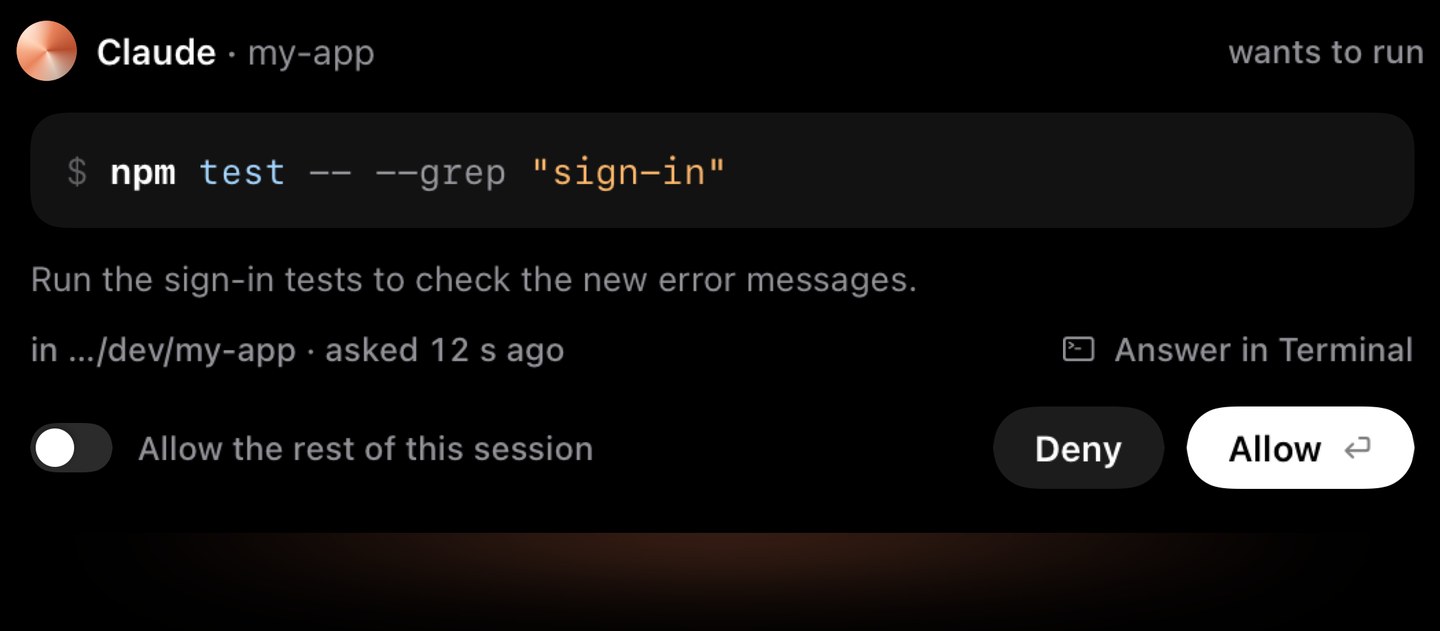
Crest’s sheet for one request. The whole command, the folder, the agent’s reason, and the switch that trusts this one session.
- “Allow the rest of this session” is a switch on that sheet. Turn it on as you allow, and later requests from the same session are allowed for you until the session ends. Other sessions still ask.
- For Claude Code, commands reach the notch from Manual mode sessions; in auto mode Claude Code’s own reviewer handles them and Crest stays out of the way. Codex and Copilot CLI requests reach it whenever they would ask.
- Answering is free, with no account. Crest Pro adds the Agents widget, which lists every session; Pro, with Take and Minutes, is $24.99 once or $2.99 a month.
- Download Crest. Signed and notarized.Free tier, no account · 7-day Pro trial, no card · macOS 14 or later
- Open Crest’s Settings, go to Coding agents and turn on “Allow or deny commands here”.
More: Claude Code in the notch, Codex approvals in the notch and Copilot CLI approvals in the notch. And to know when an agent is waiting without watching it: Claude Code notifications and Codex notifications.
Sources
- Anthropic, Claude Code docs, Configure permissions and Choose a permission mode. Read 6 October 2026. Rule syntax and order (deny, ask, allow), where “don’t ask again” saves, project allow rules waiting for workspace trust, what a Bash rule does not match, the six modes, auto mode as the default from 2.1.283, and the warnings on
bypassPermissions. - OpenAI, Codex docs, Agent approvals and security and Rules. Read 6 October 2026. The sandbox and approval presets, read-only outside version control,
approvals_reviewer = "auto_review", the full-access flag,prefix_rule. - GitHub Copilot CLI 1.0.88,
copilot help permissionsandcopilot help config, read 6 October 2026:shell(command)patterns, deny over allow,--allow-alland--yolo,defaultPermissionMode. - Our own runs, 6 October 2026, on macOS 27.0.1 with Claude Code 2.1.288, Codex CLI 0.160.1 and Copilot CLI 1.0.88, in throwaway folders. Every rule result on this page is one we ran.
- Crest source, read 6 October 2026: ApprovalHook.swift, AllowSheet.swift, AgentMonitor.swift.
FAQ
How do I make Claude Code stop asking for permission?
Allow the commands you trust in ~/.claude/settings.json, for example "permissions": {"allow": ["Bash(npm run *)", "Bash(npm test *)"]}, or pick "Yes, and don't ask again" on a prompt, which saves the rule to .claude/settings.local.json. Since Claude Code 2.1.283 new terminal sessions also start in auto mode, where a reviewer model answers most actions. Turning every check off is possible but meant for containers.
Is --dangerously-skip-permissions safe?
Not on your own Mac. It turns off permission prompts and most safety checks, so a mistaken or prompt-injected command runs with no chance to stop it. Anthropic's docs say to use it only in isolated containers or VMs. Allow lists or auto mode cut prompts without that risk.
How do I auto-accept bash commands in Claude Code?
Add allow rules such as Bash(npm test *) or Bash(git commit *) under permissions.allow. Put the * after the subcommand: Bash(git *) would also allow git push. Rules are checked deny, then ask, then allow.
Why does Codex keep asking for permission all the time?
Usually because a command needs to leave its sandbox (the network, or a write outside the project), or because the folder is not a git repository, where Codex suggests a read-only sandbox. Run it in a repository, add prefix_rule entries in ~/.codex/rules/default.rules for the commands you trust, or answer "Yes, and don't ask again" (p), which writes that rule for you.
What does approval_policy never do in Codex?
It stops Codex asking, but the sandbox still holds: a command the sandbox blocks fails instead of asking you. The flag that removes both, --dangerously-bypass-approvals-and-sandbox (--yolo), is the one OpenAI marks Elevated Risk.
How do I allow all commands in Copilot CLI?
--allow-all-tools allows every tool, and --allow-all or --yolo also allows every path and URL. Safer: --allow-tool 'shell(npm test)' for the commands you trust, plus --deny-tool for the ones you never want; deny always wins.
Can I allow a whole session instead of each command?
With Crest, yes: the sheet on the notch has an Allow the rest of this session switch, which trusts that one session until it ends. Answering on the notch is free.
Try Crest free
Download it with no account. Now Playing, the Shelf, the Clipboard and window snapping are free for good, and signing in gives you 7 days of Pro with no card. Pro, with Take and Minutes, is $24.99 once, on 2 Macs, or $2.99 a month.
Download Crest for macOS Get Crest Pro, $24.99Free forever. Pro free for 7 days, no card needed.
macOS 14 Sonoma or later · signed and notarized by Apple · 7-day refund
Keep reading: Claude Code notifications on Mac · Codex CLI notifications on Mac · Claude Code in the notch · Notch apps for AI agents · For teams and IT · Crest overview