Claude Code vs Codex: which coding agent should you use?
Pick Claude Code if you already pay for Claude or want Anthropic’s models, and Codex if you already pay for ChatGPT or want OpenAI’s. Both run in the terminal, in VS Code and Cursor, in JetBrains IDEs and in a desktop app, both come with a $20 a month plan, and both stop to ask before risky actions, in different ways. Neither maker publishes a head-to-head, so the fair test is the same small task in both on your own repository, and nothing stops you from keeping both.
Last updated: October 2026
Written by the developer of Crest, a notch app that works with both, 7 October 2026. Neither Anthropic nor OpenAI is affiliated with Crest. Plans, prices and models are from each maker’s own pages, read that day and listed under Sources; they change often, so check the maker’s page before you pay. Versions were checked on a 16-inch MacBook Pro (Mac16,7) on macOS 27.0.1. We ran no benchmark and make no claim about which writes better code. Crest comes last.
Side by side
| Read 7 October 2026 | Claude Code | Codex |
|---|---|---|
| Made by | Anthropic | OpenAI |
| Command | claude | codex |
| Checked on this Mac | 2.1.292 | Codex CLI 0.160.1 |
| Also runs in | VS Code and Cursor, JetBrains IDEs, the Claude desktop app (Code tab), the web at claude.ai/code, the Claude app for iOS and Android, Slack | VS Code, Cursor and Windsurf, Xcode and JetBrains IDEs, the ChatGPT desktop app (Codex), Codex cloud on the web, iOS, Slack |
| Models | Fable, Opus, Sonnet and Haiku (opus is Opus 5.5 and sonnet is Sonnet 5.5 on Anthropic’s API) | GPT-6.1 Sol and GPT-6 Luna recommended, GPT-6 Astra the most capable; GPT-5.5 leaves Codex on 14 October 2026 |
| Cheapest plan with the CLI | Claude Pro: $20 a month, or $17 a month billed yearly | ChatGPT Plus: $20 a month |
| Free way in | None: Claude Free does not include Claude Code | ChatGPT Free and Go ($8) list GPT-6 Luna in the desktop app, subject to rollout |
| Bigger plans | Max, from $100 a month, with 5x or 20x Pro’s usage | Pro: $100, $200 or $500 a month |
| Teams | Team: $20 a seat a month billed yearly, $25 monthly | Business: $20 a user a month billed yearly, $25 monthly, 2 users or more |
| Pay as you go | An Anthropic Console account at API rates, or usage credits on a paid plan | An API key at API prices (no cloud features), or credits on Plus and Pro |
| Usage limits | A rolling five-hour window plus weekly limits, shared with your Claude chats | A five-hour allowance on Plus that depends on the model, weekly limits may apply, shared with ChatGPT Work |
| Asking before it acts | Permission modes. Auto mode, where a reviewer model checks actions, is where terminal sessions start | An OS sandbox plus an approval policy: it asks when a command needs to leave the project or reach the network |
| Allow your trusted commands | permissions.allow in settings.json | prefix_rule in ~/.codex/rules/ |
| Project instructions | CLAUDE.md (it can read AGENTS.md instead) | AGENTS.md |
| Answer its prompts from the notch | Yes, with Crest, free | Yes, with Crest, free |
Prices in US dollars, as each maker lists them. Both makers change plans and limits often: check Anthropic’s page and OpenAI’s page before you pay.
What each one is
Claude Code is Anthropic’s coding agent. Its docs call it “an agentic coding tool that reads your codebase, edits files, runs commands, and integrates with your development tools”. It runs Claude models, and you sign in with a Claude plan or an Anthropic Console account.
Codex is OpenAI’s. The name covers several things: the Codex CLI in your terminal, the IDE extension, Codex inside the ChatGPT desktop app, and Codex cloud, which runs tasks in OpenAI’s containers. It runs OpenAI’s GPT models, and you sign in with ChatGPT or an API key.
They work the same way at heart: you describe a change, the agent reads the code, edits files and runs commands, and asks you before the risky ones. Both read instructions from a file in the repository, CLAUDE.md for Claude Code and AGENTS.md for Codex, and Anthropic’s docs say Claude Code can read an AGENTS.md in place of a CLAUDE.md. Both connect to other tools through MCP and both can hand parts of a task to subagents.
Where you can run them
- Terminal.
claudeorcodexin a project folder. For scripts and CI,claude -pandcodex execrun without a conversation. - Editors. Claude Code has an extension for VS Code and Cursor and a plugin for JetBrains IDEs, which needs the CLI installed. Codex has an extension for VS Code, Cursor and Windsurf, and works in Xcode and JetBrains IDEs through their own agent integrations.
- Desktop app. Claude Code is the Code tab of the Claude desktop app, which includes Claude Code, so you need no separate CLI, but it needs a paid plan. Codex lives in the ChatGPT desktop app: you choose Codex when you start. On this Mac,
codex appis listed as “Launch the Desktop app (opens the app installer if missing)”. - Web and phone. Claude Code runs at claude.ai/code and in the Claude app for iOS and Android. Codex cloud runs on the web and on iOS, and needs a ChatGPT sign-in, not an API key.
So “desktop app or terminal?” is the same trade on both sides: the app shows diffs and parallel sessions in a window, the terminal fits scripts, SSH and your own editor.
Models
Claude Code picks a model with /model or --model, by alias: fable, opus, sonnet, haiku, or opusplan, which plans with Opus and writes with Sonnet. On Anthropic’s API, opus is Opus 5.5, sonnet is Sonnet 5.5 and fable is Fable 5.1. Anthropic’s pricing table lists Opus and Sonnet on every paid plan; Fable is listed on Pro as usage credits only, and on Max at 50% of the weekly limits.
Codex picks a model with /model or --model (-m). OpenAI recommends GPT-6.1 Sol for complex coding and GPT-6 Luna for focused, repeatable tasks, and calls GPT-6 Astra its most capable model. GPT-5.5 leaves ChatGPT and Codex on every plan on 14 October 2026, so change any saved gpt-5.5 setting before then.
Which model writes better code is the question everyone asks, and we cannot answer it honestly. Each maker publishes its own numbers for its own models, and they move with every release.
Plans and pricing
Both are bundled with a chat subscription you may already have, and both can run on pay-as-you-go API keys instead. Read 7 October 2026; these change often, so check the maker’s page.
- Claude Code is in every paid Claude plan and not in Free: Pro is $20 a month, or $17 a month billed yearly ($200 up front), and Max starts at $100 a month for 5x or 20x Pro’s usage. Team seats are $20 a month billed yearly or $25 monthly, with a premium seat at $100 or $125. Anthropic says Claude Code “shares the same usage limits as the rest of your plan”: a rolling five-hour window, with weekly limits on top for paid plans. Past the limit you can wait, upgrade, or turn on usage credits at standard API rates.
- Codex comes with ChatGPT. Plus, $20 a month, lists Codex on the web, in the CLI, in the IDE extension and on iOS. Pro starts at $100 and comes at $100, $200 or $500 a month, and OpenAI says Pro plans currently have no five-hour limit. Free and Go ($8) list GPT-6 Luna in the desktop app, subject to rollout. Business is $20 a user a month billed yearly, or $25 monthly, for 2 users or more. Plus and Pro users can buy credits past the limit, and an API key runs the CLI, SDK and IDE extension at API prices, without the cloud features.
At the same $20, Claude Pro and ChatGPT Plus give allowances that neither maker states as a fixed number: OpenAI’s own estimate for Plus is 15 to 160 local messages per five hours on GPT-6.1 Sol, depending on the task. A week of real work on each tells you more than the price does.
How each one asks before it acts
This is the biggest practical difference, and it decides how often you get interrupted.
- Claude Code decides by what the action is. It has permission modes. In Manual it asks before most file edits, shell commands and network calls.
acceptEditslets edits through, and auto mode hands the asking to a second model, a classifier, that reviews each action instead of you. Since version 2.1.283, auto is where interactive terminal and VS Code sessions start. Shift+Tab switches modes, and allow rules insettings.jsonlet your everyday commands through. - Codex decides by where the action reaches. It runs commands in a sandbox enforced by the operating system, plus an approval policy. In its Auto preset (
--sandbox workspace-write --ask-for-approval on-request) it reads, edits and runs commands inside the project without asking, with the network off, and asks when a command needs to write outside the project or reach the network./permissionsswitches presets, andprefix_rulefiles allow the commands you trust.
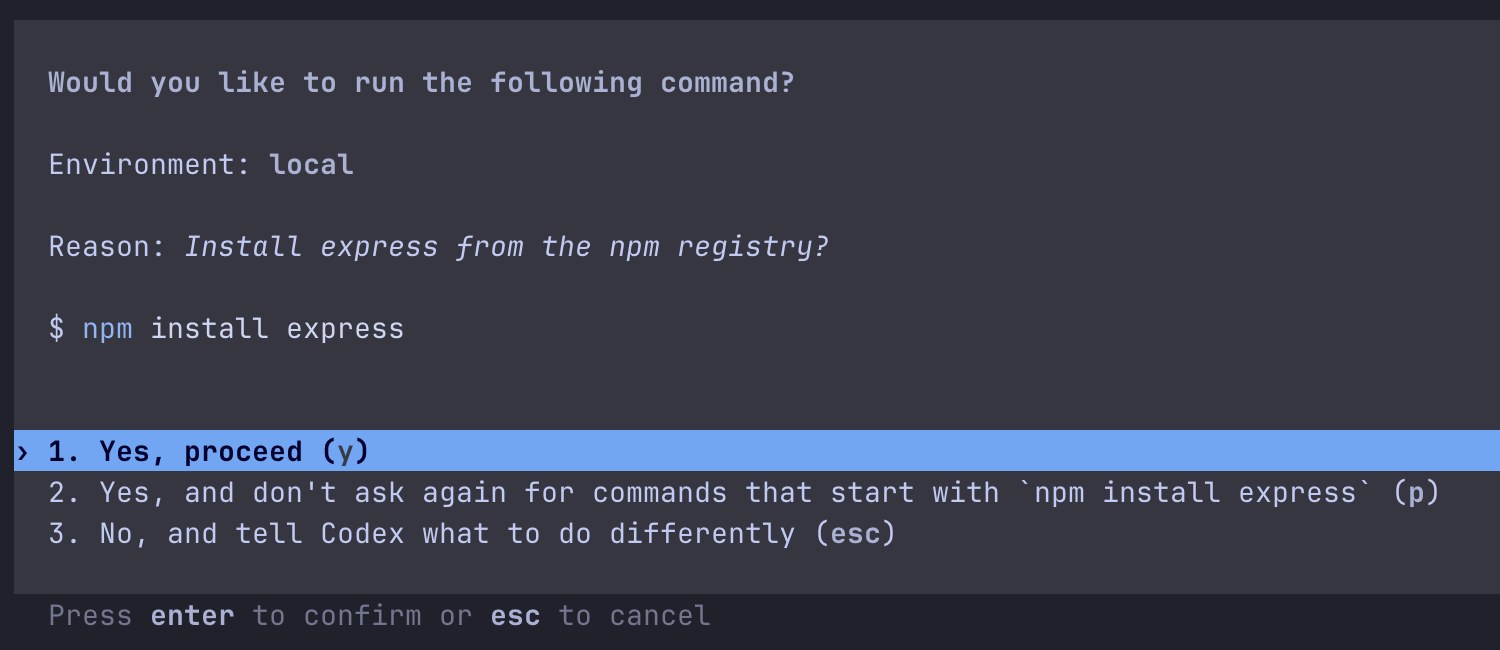
Codex asking to leave its sandbox. Codex CLI 0.160.1 in our 6 October test: installing a package needs the network, which the default sandbox keeps off. Answer 2 saves a rule so the same command never asks again.
Both also have a switch that removes every check, and both makers say to use it only somewhere isolated. Here is how each CLI on this Mac describes its modes and that switch, shortened:
$ claude --version
2.1.292 (Claude Code)
$ claude --help
  --permission-mode <mode>   (choices: "acceptEdits", "auto",
                             "bypassPermissions", "manual", "dontAsk", "plan")
  --dangerously-skip-permissions   Bypass all permission checks.
                             Recommended only for sandboxes with no internet access.

$ codex --version
codex-cli 0.160.1
$ codex --help
  -s, --sandbox <SANDBOX_MODE>
          [possible values: read-only, workspace-write, danger-full-access]
  -a, --ask-for-approval <APPROVAL_POLICY>
          - on-request: The model decides when to ask the user for approval
          - never:      Never ask for user approval
      --approve-for-me
          Route approval requests through automatic review using the workspace-write sandbox
      --dangerously-bypass-approvals-and-sandbox
          Skip all confirmation prompts and execute commands without sandboxing. EXTREMELY
          DANGEROUS. Intended solely for running in environments that are externally sandboxed
Asked too often by either one? The exact allow rules for both, tested, are on why Claude Code and Codex keep asking for permission.
Installing them on a Mac
Each has an install script, and both are Homebrew casks. Codex is also on npm:
# Claude Code: Anthropic's installer (updates itself), or Homebrew
curl -fsSL https://claude.ai/install.sh | bash
brew install --cask claude-code

# Codex CLI: OpenAI's installer, npm, or Homebrew
curl -fsSL https://chatgpt.com/codex/install.sh | sh
npm install -g @openai/codex
brew install --cask codex- Updates. Anthropic’s installer keeps Claude Code updated in the background; its docs say the Homebrew cask does not, so run
brew upgrade claude-code. OpenAI’s update command is the install line again, ornpm install -g @openai/codex, orbrew upgrade --cask codex. - Signing in. Run
claudein a project and log in on first use, or setANTHROPIC_API_KEY. Runcodexand choose Sign in with ChatGPT, or an API key. - On this Mac, Claude Code came from Anthropic’s installer and sits in
~/.local/bin. The Codex CLI we checked was an npm copy, and Copilot CLI came from Homebrew.
Which one is the better pick for you
Claude Code makes more sense when:
- you already pay for Claude, since Claude Code shares the plan’s usage at no extra cost;
- you want fewer prompts without switching checks off, since auto mode’s reviewer is where terminal sessions start;
- you want Anthropic’s models, Fable included on Max.
Codex makes more sense when:
- you already pay for ChatGPT, since Plus includes the Codex CLI;
- you want a sandbox enforced by macOS by default, so commands inside the project run without asking and the network stays off;
- you work in Xcode or Windsurf, where OpenAI lists an integration;
- you want to try it free: ChatGPT Free lists GPT-6 Luna in the desktop app, subject to rollout, while Claude Free has no Claude Code.
If neither of those settles it, give both the same small task, such as a failing test to fix, in the same repository, and keep the one whose result and prompts you prefer.
Running both, and answering both from the notch
You can run both on one project. They can share an AGENTS.md, and both CLIs start a session in its own git worktree with --worktree, so they never edit the same files at once. More on that in how to run several sessions at once. The cost is two plans.
The other cost is two terminals asking you things. Crest, a Mac notch app made by the author of this page, puts Claude Code, Codex and Copilot CLI permission requests on the notch, with the whole command and the folder, and you press Allow or Deny without finding the tab.
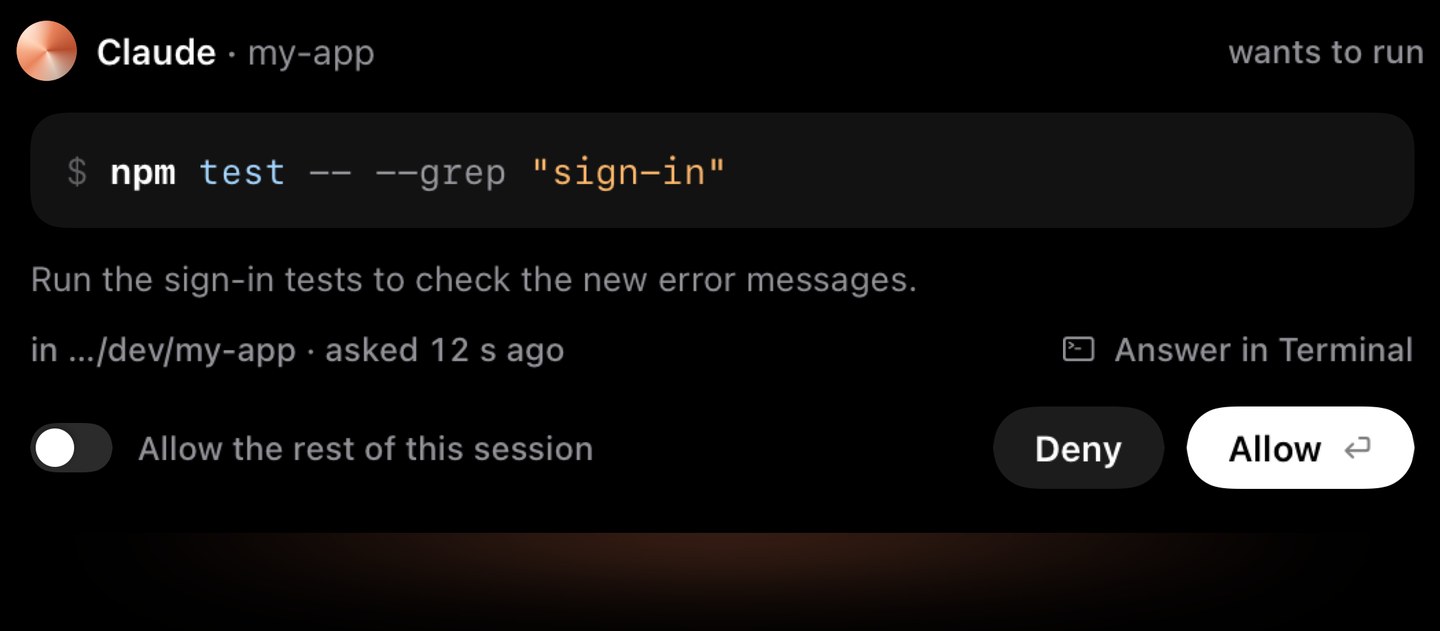
A Claude Code request on the notch. A Codex or Copilot CLI request opens the same sheet with that agent’s name.
- Answering is free, with no account. Crest Pro adds the Agents widget, which lists every session; Pro, with Take and Minutes, is $24.99 once or $2.99 a month.
- For Claude Code, commands reach the notch from Manual mode sessions; in auto mode Claude Code’s own reviewer handles them. Codex and Copilot CLI requests reach it whenever they would ask.
- It does not run either agent, pick a model or touch your plan. Your terminals stay as they are.
- Download Crest. Signed and notarized.Free tier, no account · 7-day Pro trial, no card · macOS 14 or later
- Open Crest’s Settings, go to Coding agents, check that Claude Code and Codex are on, and turn on “Allow or deny commands here”.
More: Claude Code in the notch, Codex approvals in the notch, Claude Code notifications on a Mac and the Crest overview.
Sources
- Anthropic: Claude plans and pricing (plans, prices, which include Claude Code, usage limits, usage credits, models per plan); Claude Code docs: Overview (surfaces, install, sign-in, AGENTS.md), Choose a permission mode and Model configuration. Read 7 October 2026.
- OpenAI: Codex pricing (developers.openai.com/codex/pricing now redirects there), Codex CLI, Codex IDE extension, Authentication, Agent approvals and security and Models. Read 7 October 2026.
- GitHub: Installing GitHub Copilot CLI. Read 7 October 2026.
- Our own checks, 7 October 2026, on a 16-inch MacBook Pro (Mac16,7) on macOS 27.0.1:
claude --versionand--help(Claude Code 2.1.292),codex --versionand--help(Codex CLI 0.160.1, from an npm copy left over from our 6 October tests) andcopilot --version(1.0.88). Nothing was installed or signed in for this page. The Codex prompt picture is from our 6 October test. - Crest source, read 7 October 2026: SettingsCatalog.swift (Settings, Coding agents), AgentMonitor.swift.
FAQ
Is Claude Code better than Codex?
Neither is better for everyone, and neither maker publishes a head-to-head. Pick by the plan you already pay for and the models you want: Claude Code runs Anthropic's Claude models, Codex runs OpenAI's GPT models. Then run the same small task in both on your own code.
Codex vs Claude Code: which is cheaper?
They start at the same price: Claude Pro and ChatGPT Plus are both $20 a month (Claude Pro is $17 a month billed yearly), read 7 October 2026. ChatGPT Free and Go list a Codex model in the desktop app, subject to rollout; Claude Free has no Claude Code. Bigger plans start at $100 a month on both. Check each maker's pricing page, since limits change often.
Can I use Claude Code and Codex together?
Yes. Run each in its own terminal or its own git worktree (both CLIs have a --worktree option) so they never edit the same files at once, and give them one AGENTS.md, which Claude Code can read in place of a CLAUDE.md. You pay for two plans.
What do people on Reddit say about Codex vs Claude Code?
Threads swing with every model release, so read them by date. What does not change as fast is on the makers' pages: which plans include each agent, the models, and how each asks before acting. This page sticks to those, read 7 October 2026.
Cursor vs Claude Code: what is the difference?
Cursor is a code editor with its own agent; Claude Code is an agent you run in a terminal, an editor or the Claude desktop app. They are not either-or: Anthropic and OpenAI both offer their agent as an extension you can install in Cursor.
Copilot CLI vs Claude Code?
GitHub Copilot CLI is GitHub's terminal agent and needs an active GitHub Copilot subscription. It also asks before commands and file writes by default. Crest answers its prompts from the notch too, for free.
Codex CLI or the Codex app?
Same agent, different window. The CLI fits scripts, SSH and your own editor; Codex in the ChatGPT desktop app shows chats and diffs in a window. Both sign in with ChatGPT or an API key, and codex app opens the desktop app from the terminal.
Does Claude Code work with a ChatGPT subscription, or Codex with a Claude one?
No. Claude Code signs in with a Claude plan or an Anthropic Console account, and Codex with ChatGPT or an OpenAI API key.
Try Crest free
Download it with no account. Now Playing, the Shelf, the Clipboard and window snapping are free for good, and signing in gives you 7 days of Pro with no card. Pro, with Take and Minutes, is $24.99 once, on 2 Macs, or $2.99 a month.
Download Crest for macOS Get Crest Pro, $24.99Free forever. Pro free for 7 days, no card needed.
macOS 14 Sonoma or later · signed and notarized by Apple · 7-day refund
Keep reading: Make the agents ask less · Several Claude Code sessions · Claude Code notifications on a Mac · Codex CLI notifications on Mac · Notch apps for AI agents · Crest overview