Minutes vs Granola: which meeting notetaker should you use?
By the makers of Minutes · updated July 2026 · full disclosure

Minutes needs macOS 26 on a Mac with Apple silicon. 7-day trial, no card.
| Minutes | Granola | |
|---|---|---|
| Price | $9.99 one-time | Monthly subscription |
| Account required | No cloud account, no API key | Yes, sign-in required |
| Transcription | On your Mac, Apple SpeechAnalyzer | In Granola's cloud |
| Summaries | On your Mac, Apple FoundationModels | In Granola's cloud |
| What is uploaded | Nothing leaves your Mac | Transcript and notes to the cloud; audio uploaded for transcription, then deleted |
| Works fully offline | Yes, after activation | Needs the cloud to process |
| Your notes are | Plain Markdown plus audio, in a folder you own | Kept inside Granola's app and cloud |
Why Minutes is better
- Nothing is uploaded. Granola sends your transcript and notes to its cloud, while Minutes keeps everything on your Mac.
- One-time price. Minutes is $9.99 once.
- Files you own. Every note is plain Markdown next to its audio, in a folder you choose.
- Catches you approve. Nothing goes to Calendar or Reminders until you tap it.
Download Minutes freeBuy Minutes, $9.99
Minutes needs macOS 26 on a Mac with Apple silicon · 7-day refund
Full comparison and details
Every meeting you take with Granola ends up in its cloud, and the bill comes every month. We built Minutes for people who would rather keep their meetings to themselves: it is a native Mac app that records, transcribes and summarizes entirely on your Mac, for one payment, into plain files you own. Here is the side-by-side.
Last updated: July 2026
Full disclosure: this page is published by the makers of Minutes, part of the Crest suite.
Up front, because it decides everything: Minutes requires macOS 26 or later on an Apple Silicon Mac. That is the reason Minutes can run its transcription and summaries entirely on your Mac, with nothing sent to anyone's cloud.
The short version
Pick Minutes if you want every meeting to stay on your Mac with nothing uploaded, a one-time price instead of a subscription, and plain Markdown files you own, and you are on macOS 26 or later with Apple Silicon.
Side by side
The comparison table is at the top of this page.
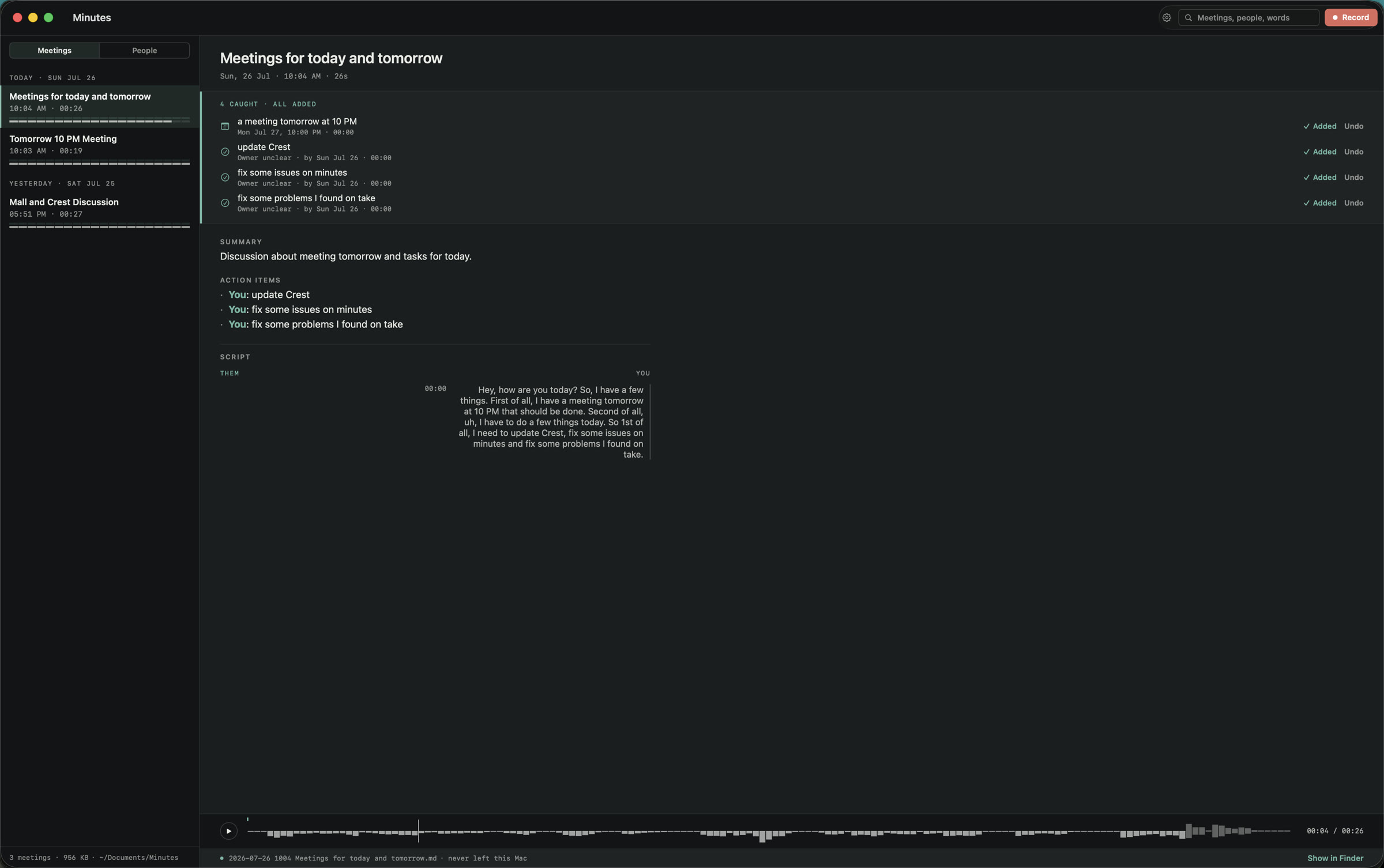
This is a real Minutes note, with its catches, its summary and a transcript that keeps your side and their side apart, all on the Mac.
Where Minutes is better
- Nothing is uploaded. Granola captures audio on your Mac, then sends the transcript and notes to its cloud to process and store, and uploads the audio for transcription before deleting it. Minutes does recording, transcription and summaries on your Mac. Unplug the network and it still works, because there is no server on the other end.
- One-time price. Minutes is $9.99 once, yours for good on 2 Macs. Granola is a monthly subscription, so the meter never stops, and over a couple of years that gap is large.
- Files you own. Every meeting is plain Markdown next to its audio, in a folder you choose, so you can point Obsidian at it, drop it in a git repo or back it up like anything else. Granola keeps your notes inside its own app and cloud.
- No cloud account, no keys. Your notes are not kept in any account, there is no API key to paste and nothing to sync. You sign in once inside the app for the trial or the licence, and that is all it knows.
- Catches you approve. Minutes reads the meeting for what was actually agreed and surfaces it as catches. You review each one, then send it to Apple Calendar and Reminders with a tap. Nothing is filed behind your back.
We built Minutes around one idea that Granola's design cannot offer: your meeting never leaves your machine.
The privacy difference, in plain terms
This is the row that usually decides it. With Granola, your meeting is processed and stored in the cloud: the transcript and notes are sent to Granola's servers, and the audio is uploaded for transcription and then deleted. That is how cloud tools work, and it is exactly the problem for the meeting that legally, or personally, must never leave your machine. Minutes was built for exactly that meeting: the recording, the transcript and the summary all stay on your Mac, with no cloud account and no server involved.
The pricing math
Minutes is $9.99 one-time, yours for good on up to 2 Macs. Granola runs on a monthly subscription, which is convenient to start and never stops. If you keep meeting notes for years, the one-time purchase is simply cheaper, and there is no renewal to forget.
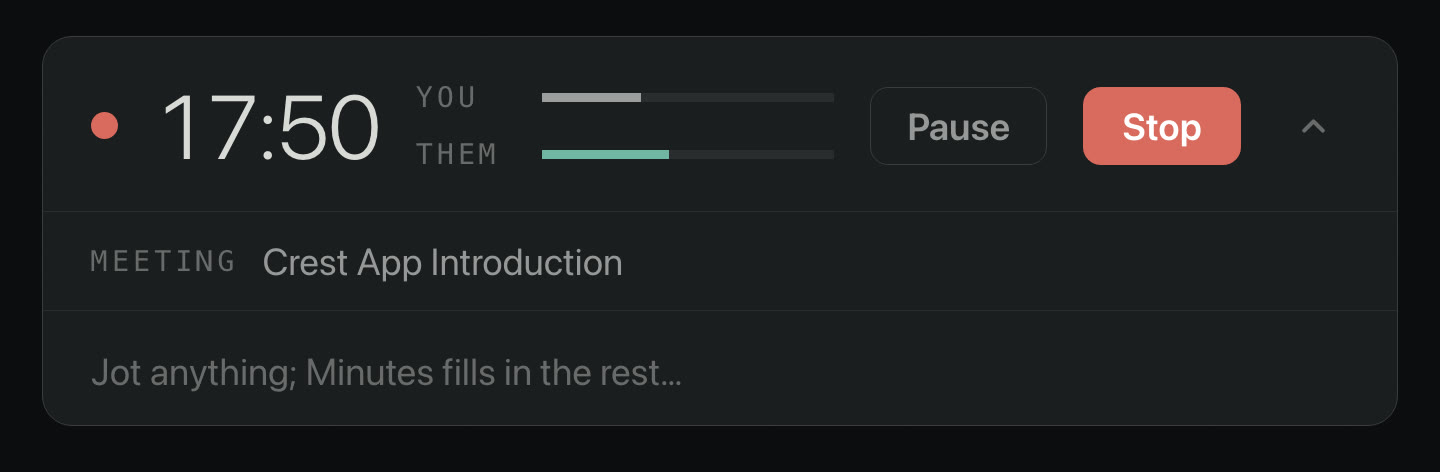
This is Minutes while it records. The indicator stays visible the whole time, so nobody is recorded without knowing.
The requirement, stated plainly: macOS 26 or later on Apple Silicon
Minutes only runs on macOS 26 or later on an Apple Silicon Mac. There is no Intel build and no build for older macOS versions, and there will not be. The reason is the same reason it can be fully on-device: Minutes transcribes with Apple's SpeechAnalyzer and summarizes with Apple's FoundationModels, and those frameworks ship only with macOS 26. That is also why there are no model downloads: the intelligence is already on your Mac. If you are still on an older macOS or an Intel Mac, Minutes will not run for you yet, and we would rather you know that before you buy than after.
How to decide
Ask one question: does your meeting need to leave your Mac? For almost every meeting, the answer is no. If it can stay on your machine, as plain files you own, for one payment, that is what we built Minutes for, provided you are on macOS 26 or later with Apple Silicon. See Minutes for the full walkthrough.
FAQ
Is Minutes cheaper than Granola?
Yes, over time. Minutes is $9.99 one time, yours for good on 2 Macs. Granola is a monthly subscription, so its cost keeps adding up every month you use it. If you keep meeting notes for years, a one-time purchase is the cheaper path.
Does Minutes upload my meetings the way Granola does?
No. Granola captures audio on your Mac but sends the transcript and notes to its cloud to process and store them, and it uploads the audio for transcription before deleting it. Minutes does all of it, recording, transcription and summaries, on your Mac. Nothing is uploaded, because there is no server.
What Macs does Minutes need?
Minutes requires macOS 26 or later on an Apple Silicon Mac, and this is a real limit, not a preference. It transcribes with Apple's on-device SpeechAnalyzer and summarizes with Apple's on-device FoundationModels, and those frameworks ship only with macOS 26. Granola avoids that requirement only by sending your meeting to its cloud.
Can I keep my Minutes notes in Obsidian or git?
Yes. Every meeting is plain Markdown next to its audio, in a folder you choose, so you can point Obsidian at it, drop it in a git repo or back it up like any other files. There is no proprietary database and no lock-in.
Meeting notes that never leave your Mac
Minutes records both sides of the call, transcribes and summarizes it on your Mac, and saves plain Markdown you own, with no cloud and no subscription required. It is $9.99 once, yours for good on 2 Macs.
Minutes needs macOS 26 on a Mac with Apple silicon. Minutes is $9.99 once, with a 7-day trial first.
More comparisons: Best Mac meeting notes apps in 2026 · vs Otter.ai · vs Fathom · vs Fireflies.ai · vs tl;dv · vs Notion AI · Private, on-device notes · Notes without a bot · Minutes overview