Drag files to the notch: file shelf apps for Mac
A notch file shelf is a holding spot at the top of the screen: drag a file to the notch, it waits there, and you drag it out again wherever it needs to go. macOS has nothing like it built in. Crest's Shelf is part of its free tier, and The Boring Notch, Atoll and NotchDrop are free too. DropNotch is free but only shares what you drop, through AirDrop, Mail or Messages, and keeps nothing. Droppy, $9.99 once, does the most with files. Each one is below.
Last updated: October 2026
Written by the developer of Crest, 6 October 2026. Crest's Shelf was tried on a 16-inch MacBook Pro (Mac16,7) on macOS 27.0.1 with Crest 6.4.0 and files from a scratch folder, and the pictures are captures of Crest's own window on that Mac. The other apps are described from their own websites, GitHub pages, App Store listing and changelogs, read the same day; we did not install them. Sources are at the end.
How Crest's Shelf works
- Download Crest and open it. The Shelf is in the free tier, with no account.
- Drag a file from the Finder toward the notch. Before you reach it, the notch opens into three places to let go: Shelf, AirDrop and Ask Claude.
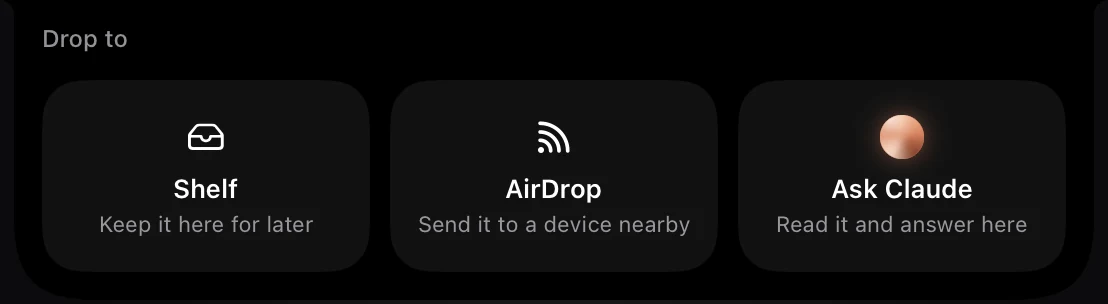
Let go on Shelf, and the notch keeps count of what it holds.

When you need a file, point at the notch to open the Shelf and drag the file out to wherever it goes: a mail, a chat, a folder or an upload page. Or select files on the Shelf and AirDrop, compress, convert, reveal or remove them, or use Save all and Clear all.
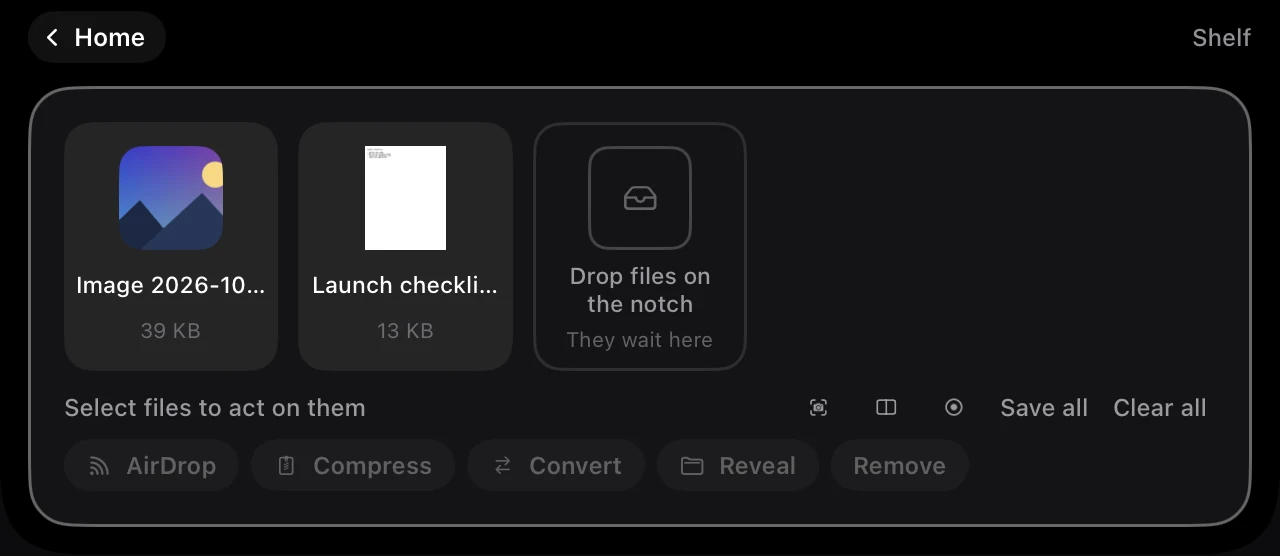
A document you drop stays in its folder: the Shelf points at it rather than moving it. The Shelf holds 40 files and keeps them until you clear them; Settings, Shelf and clipboard can let them go after a day or a week instead, and can put every new screenshot on the Shelf as it is taken. AirDrop from the notch is free too, and so is the Clipboard, Crest's history of what you copied: how it compares with the one built into macOS 26 and 27 is in clipboard history on a Mac. Ask Claude, which hands a file to Crest's Claude panel, is part of Crest Pro.
The apps at a glance
| Price | Keeps files | AirDrop | Needs | |
|---|---|---|---|---|
| Crest | Free tier | Yes, up to 40, until you clear them, or a day or a week | Yes | macOS 14 |
| The Boring Notch | Free, open source | Yes | Yes | macOS 14 |
| Atoll | Free, open source | Yes | Its README credits an AirDrop surface | macOS 14, notched MacBooks |
| NotchDrop | Free | Yes, a day by default, and you can change it | Yes | macOS 13 |
| DropNotch | Free | No: it shares what you drop and keeps nothing | Yes, plus Mail and Messages | macOS 12 |
| Droppy | $9.99 once | Yes: a File Tray and a Basket that comes to your pointer | A share option, by its page | macOS 14 |
From each app's own page, 6 October 2026. Only Crest was tried on this Mac.
Free shelves: The Boring Notch, Atoll and NotchDrop
- The Boring Notch is free and open source and lists a “Shelf functionality with AirDrop” next to its music player. It needs macOS 14, and its README warns that macOS will call it an app from an unidentified developer until you let it through.
- Atoll, free and open source, has a Shelf too. Its changelog shows recent work on it: removing one item, drag-selecting several as in the Finder, and a fix for files dropped on macOS 26 disappearing. It needs macOS 14 and a MacBook with a notch.
- NotchDrop does only this: drop files on the notch, open them with a click, AirDrop them, and they are kept for a day unless you change it. It is open source (MIT) and free on the Mac App Store, where its latest version, 2.16, is from November 2024. It needs macOS 13.
DropNotch, and something more useful
DropNotch is free and takes a different idea: drop a file on the notch and it offers a share menu, AirDrop, Mail, Messages and the rest. It keeps nothing, so it is a quick way to send, not a place to park files. On a screen without a notch it shows a drop zone in the menu bar. It needs macOS 12, and its last listed update, 1.0.1, is from September 2023.
If you want the same quick AirDrop plus a shelf that holds files, Crest's notch offers both when a file comes near, The Boring Notch and NotchDrop pair a shelf with AirDrop too, and Droppy adds the most on top.
Paid: Droppy
Droppy is $9.99 once, for two Macs, with a 3-day trial and macOS 14 or later. Its File Tray holds files and can zip or convert them where they sit, and a Basket flies to your pointer when you jiggle a file mid-drag. It can also make a share link to a file, which expires after 3 days. It is the most capable of these with files, and the one that costs money. More in Crest vs Droppy.
Alcove, another paid notch app, has no file shelf yet: its changelog has called the tray a work in progress since 2025 and points to a 1.8 update for it.
Sources
- Crest 6.4.0, tried on this Mac on 6 October 2026 with files from a scratch folder, and its source: the Shelf holds 40 files and keeps them until cleared, for a day or for a week.
- The Boring Notch: github.com/TheBoredTeam/boring.notch (README: “Shelf functionality with AirDrop”).
- Atoll: github.com/Ebullioscopic/Atoll (README and CHANGELOG).
- NotchDrop: github.com/Lakr233/NotchDrop and its Mac App Store listing (version 2.16, November 2024).
- DropNotch: junebytes.com/dropnotch and its What’s New page (1.0.1, 13 September 2023).
- Droppy: getdroppy.app.
- Alcove: its changelog at tryalcove.com/changelog.
FAQ
What is a notch file shelf on a Mac?
A place at the top of the screen that holds files for a moment. You drag a file to the notch, it waits there while you switch apps, and you drag it out where it needs to go. macOS has none built in; apps such as Crest, The Boring Notch, Atoll, NotchDrop and Droppy add one.
Is there a free app like DropNotch that keeps the files?
Yes. DropNotch shares what you drop and keeps nothing. Crest's free tier, The Boring Notch, Atoll and NotchDrop all keep files on a shelf in the notch until you drag them out.
Is Crest's Shelf free?
Yes, with no account and no time limit. The Shelf, AirDrop from the notch and the Clipboard are in the free tier. Ask Claude, which reads a dropped file and answers in the notch, is part of Pro.
How many files does Crest's Shelf hold, and for how long?
40 files. They stay until you clear them, unless you set Settings, Shelf and clipboard to let them go after a day or a week.
Does putting a file on the Shelf move it?
No. A document stays in its folder and the Shelf points at it, so your files do not end up somewhere unexpected.
Which notch shelf does the most with files?
Droppy, which is $9.99 once: a File Tray, a Basket that comes to your pointer, zipping and converting in place, and share links that expire after 3 days.
Try Crest free
Download it with no account. Now Playing, the Shelf, the Clipboard and window snapping are free for good, and signing in gives you 7 days of Pro with no card. Pro, with Take and Minutes, is $24.99 once, on 2 Macs, or $2.99 a month.
Download Crest for macOS Get Crest Pro, $24.99Free forever. Pro free for 7 days, no card needed.
macOS 14 Sonoma or later · signed and notarized by Apple · 7-day refund
Keep reading: Music in the notch · Crest vs Droppy · Crest vs Alcove · Crest vs MediaMate · Crest vs The Boring Notch · Notch app prices · Best Mac notch apps in 2026 · Crest overview