How to show what's playing in the MacBook notch, for free
Use a notch app: macOS shows what is playing in Control Center and the menu bar, never in the notch. Three free apps put the song there. Crest's free tier shows the cover and an equaliser on the closed notch, opens a full player when you point at it, and has synced lyrics, with no account. The Boring Notch and Atoll are free and open source, and both have a lyrics option. Alcove, Droppy and MediaMate do it for a one-time price.
Last updated: October 2026
Written by the developer of Crest, 6 October 2026. Crest's part was tried on a 16-inch MacBook Pro (Mac16,7) on macOS 27.0.1 with Crest 6.4.0 and Apple Music playing a song, and the pictures are captures of Crest's own window on that Mac. The other apps are described from their own websites, GitHub pages and changelogs, read the same day; we did not install them. Sources are at the end.
Free: the song in the notch with Crest
- Download Crest and open it. Now Playing works straight away, with no account and no trial.
- Play something in Apple Music, Spotify or any app that shows up in macOS Now Playing.
- Look at the notch. While a song plays, the cover sits on one side of it with a progress ring, and an equaliser moves on the other.

Point at the notch and a player opens under it: the cover, the song, the artist and the album, back, pause and forward, and a scrubber.
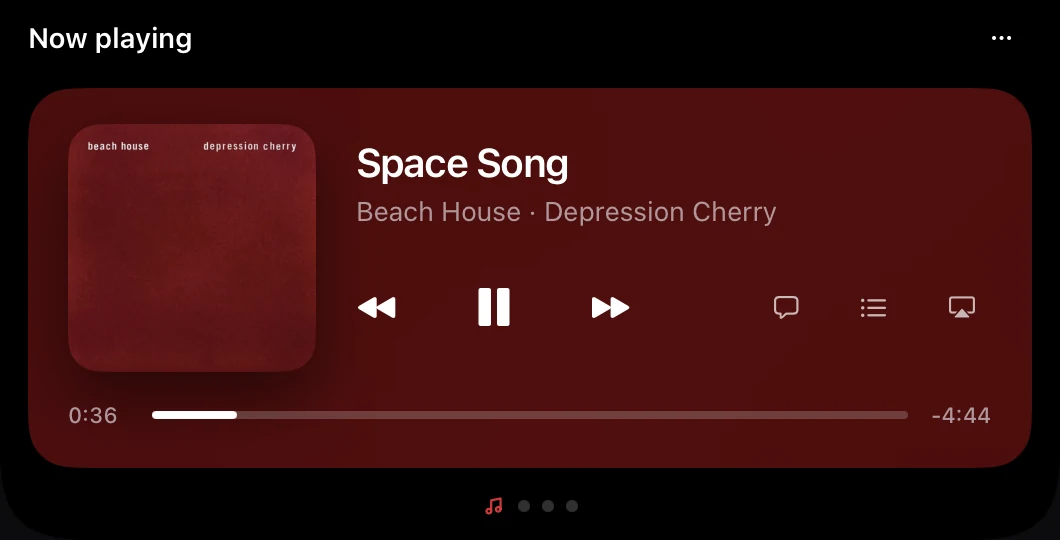
The three buttons on the right of the player open the lyrics, the queue (Apple Music's current playlist) and where the sound goes, with the volume and every output. Settings, Music sets how the song looks on the closed notch, or hides it, and has switches to show each new song for a moment and to change the volume by scrolling on the notch. All of it is in the free tier.
Lyrics in the notch
Press the speech bubble and the lyrics take the player's place. They are synced: the line being sung is lit and the list follows the song, and a music note marks a stretch with no words. Crest looks them up on LRCLIB, a free lyrics library, so they need the internet, and some songs have none: the pane then says so.
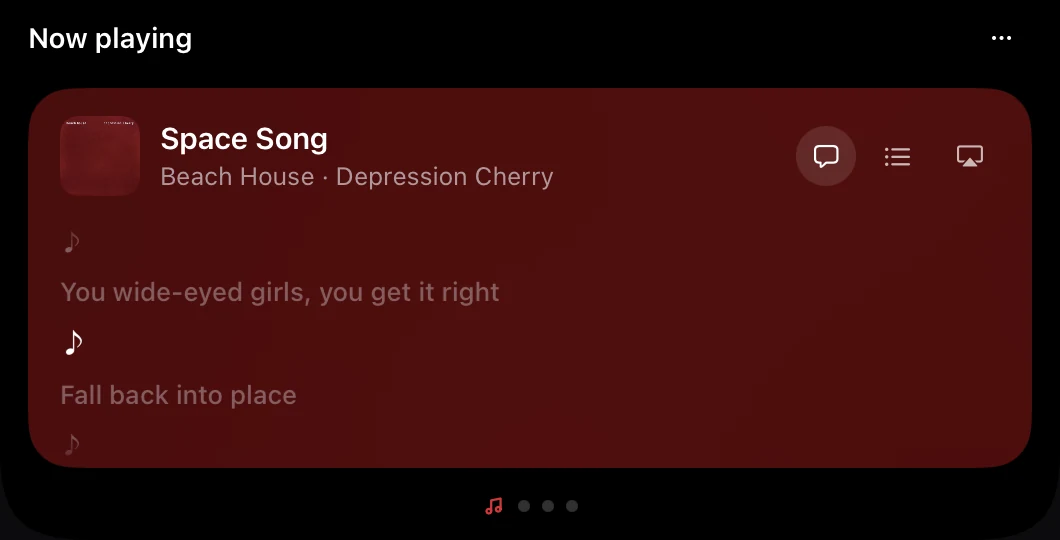
On this Mac the lyrics for a Beach House song came up a moment after the pane opened, and followed the song from there.
The apps at a glance
| Price | Lyrics | Players | Needs | |
|---|---|---|---|---|
| Crest | Free tier | Synced, free | Apple Music, Spotify, and anything else that reports to macOS Now Playing | macOS 14 |
| The Boring Notch | Free, open source | Beta setting, under the artist name | Its README: music controls and a visualizer | macOS 14 |
| Atoll | Free, open source | Yes, from LRCLIB | Apple Music, Spotify, Cider and more | macOS 14 |
| Droppy | $9.99 once | Yes, with the queue | Apple Music, named on its page | macOS 14 |
| Alcove | $14.99 once | Not in its changelog | Spotify and Apple Music, in its changelog | macOS 15 |
| MediaMate | €6.99 once | Not on its page | A Now Playing pop-up in the notch | macOS 13 |
From each app's own page, 6 October 2026. Only Crest was tried on this Mac.
The other free ones: The Boring Notch and Atoll
- The Boring Notch is free and open source (GPL-3.0), made mostly for music: a player and a visualizer in the notch, plus a calendar, a file shelf and new volume and brightness pop-ups. Lyrics are a setting marked Beta, “Show lyrics below artist name”. It needs macOS 14. Its README says the team has no Apple Developer account yet, so macOS warns that the app is from an unidentified developer and you have to let it through yourself (what that warning means: are Mac notch apps safe?). Its latest full release is 2.7.3, from November 2025, with 2.8 test builds out since September 2026. More in Crest vs The Boring Notch.
- Atoll is free and open source (GPL-3.0) and grew out of The Boring Notch's code, which its README credits. It lists controls for Apple Music, Spotify and Cider, and its changelog has a lyrics switch that looks songs up on LRCLIB, the same library Crest uses. Pinning the sung line under the closed notch is listed as not released yet. It needs macOS 14 and, by its README, a MacBook with a notch. The latest release is 2.3.3, from July 2026.
If you are happy to pay once
- Alcove, $14.99 once with a 72-hour trial, needs macOS 15. Music is one of its live activities, with a Now Playing widget on the Lock Screen, and its June changelog adds Spotify likes and repeat-one. Its changelog does not mention lyrics.
- Droppy, $9.99 once with a 3-day trial, two Macs, macOS 14. Its page shows a music player in three sizes “Your queue and lyrics, too”, Apple Music's moving covers in the notch and the player on the Lock Screen.
- MediaMate, €6.99 once on Gumroad, macOS 13. It replaces the volume and brightness pop-ups and tucks a small Now Playing pop-up into the notch. Its page does not mention lyrics.
What each costs, with trials and refunds, is on Mac notch app prices.
Without installing anything
macOS shows the song in Control Center, and System Settings, Menu Bar has a Now Playing switch that gives it its own menu bar icon. Both sit beside the notch, not in it. Apple Music and Spotify each show lyrics in their own window.
Sources
- Crest 6.4.0, tried on this Mac on 6 October 2026, and its source: Now Playing, the lyrics pane (lyrics from LRCLIB) and the Shelf are in the free tier.
- The Boring Notch: github.com/TheBoredTeam/boring.notch, its README, its Settings source (“Show lyrics below artist name”, marked Beta) and its update feed (2.7.3, 24 November 2025; 2.8-rc.1, 25 September 2026).
- Atoll: github.com/Ebullioscopic/Atoll, its README and CHANGELOG (2.3.3, 24 July 2026).
- Alcove: tryalcove.com and its changelog (1.7.9, 30 June 2026).
- Droppy: getdroppy.app.
- MediaMate: wouter01.github.io/MediaMate and its Gumroad page.
FAQ
Is there a free app that shows lyrics in the MacBook notch?
Yes. Crest's free tier shows synced lyrics in the player that opens from the notch, with no account. The Boring Notch has lyrics as a beta setting under the artist name, and Atoll has a lyrics switch. All three are free; Crest and Atoll look the lyrics up on LRCLIB, so they need the internet.
How do I see the song I'm playing in the Dynamic Island on my Mac?
Macs have no Dynamic Island, but a notch app draws one around the notch. With Crest, the cover and an equaliser sit beside the notch while a song plays, and pointing at the notch opens the player. It is free and needs no account.
Does it work with Spotify and Apple Music?
Yes. Crest reads what macOS lists as Now Playing, so Apple Music, Spotify and other players show up. The queue pane follows Apple Music's playlist. To jump to a point in a Spotify song, Crest asks Spotify through AppleScript, so macOS may ask you once to let Crest control Spotify.
Do I need Crest Pro for music in the notch?
No. Now Playing, the lyrics, the queue and the output picker are all in the free tier, which needs no account. Pro adds the widgets, such as the calendar, notes and system stats.
Does macOS show Now Playing in the notch on its own?
No. It shows it in Control Center, and System Settings, Menu Bar can add a Now Playing icon to the menu bar. Nothing from macOS uses the notch itself.
Try Crest free
Download it with no account. Now Playing, the Shelf, the Clipboard and window snapping are free for good, and signing in gives you 7 days of Pro with no card. Pro, with Take and Minutes, is $24.99 once, on 2 Macs, or $2.99 a month.
Download Crest for macOS Get Crest Pro, $24.99Free forever. Pro free for 7 days, no card needed.
macOS 14 Sonoma or later · signed and notarized by Apple · 7-day refund
Keep reading: File shelf apps for the notch · Crest vs Droppy · Crest vs Alcove · Crest vs MediaMate · Crest vs The Boring Notch · Notch app prices · Best Mac notch apps in 2026 · Crest overview