A Pomodoro timer on your Mac
macOS has no Pomodoro mode, but its Clock app gets close. Open Clock, make a 25-minute timer and a 5-minute one, and both stay under Recents for one-click restarts. On macOS 27, tick Timer in System Settings, Menu Bar, and the countdown shows in the menu bar while it runs. What macOS will not do is roll from work to break by itself or count your rounds; for that you need an app.
Last updated: October 2026
Written by the developer of Crest, 7 October 2026. Every step was tried that day on a 16-inch MacBook Pro (Mac16,7) on macOS 27.0.1; the test timers were deleted afterwards and the menu bar setting put back. Flow is described from its own site, read the same day; we did not install it.
Set up 25 and 5 in the Clock app
- Open Clock from Applications and click Timers at the top.
- Click the minutes and type 25. Type Focus in the label field under the time, and pick a sound if you like.
- Click Start. When it rings, do the same with 5 minutes and the label Break.
- From then on, both wait under Recents. Click the play button beside the one you need.
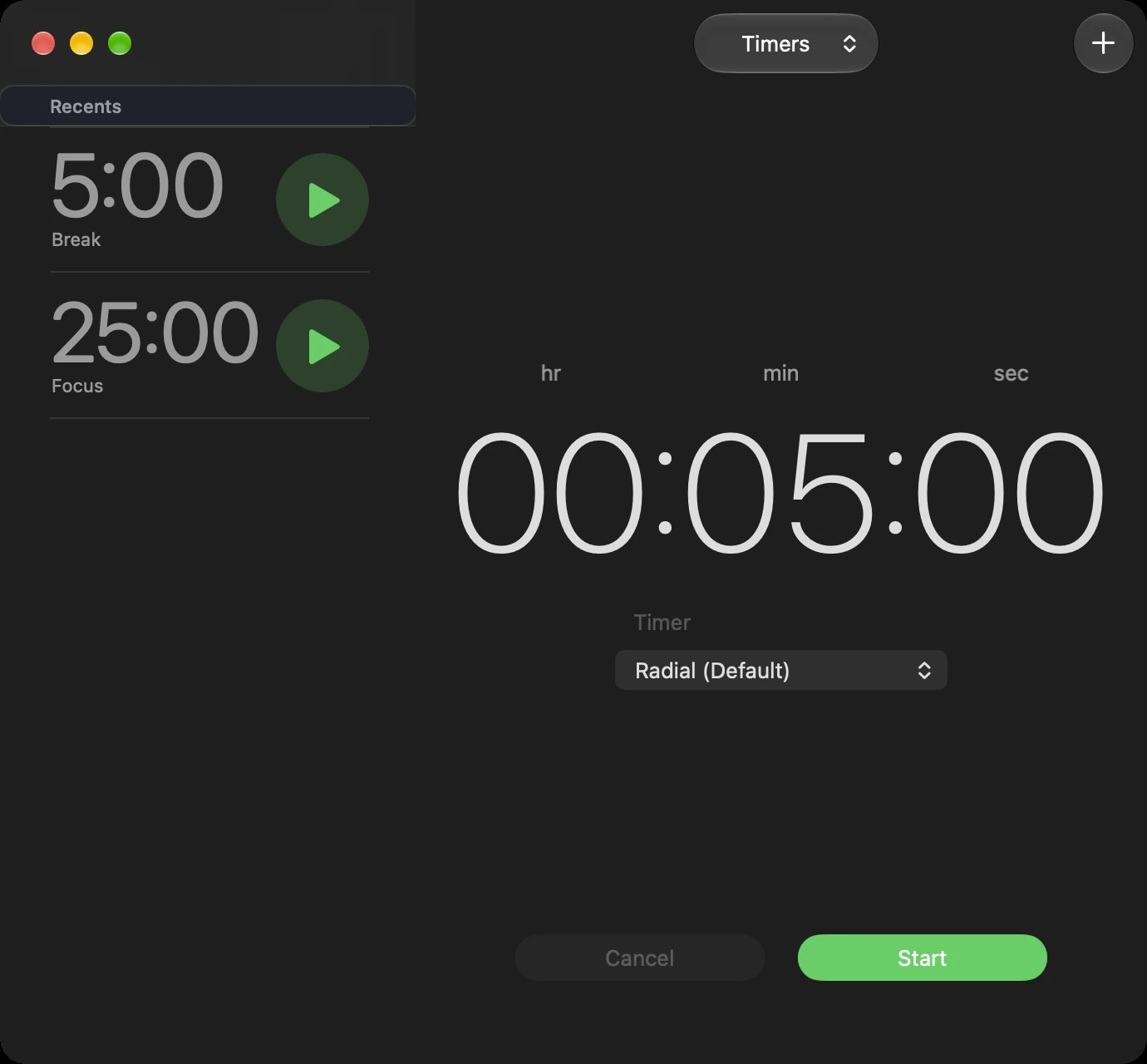
Clock, Timers: run a 25-minute Focus timer and a 5-minute Break once, and both wait under Recents with a play button.
Apple’s guide adds that you can run several timers at once, so a long break timer can run beside the others.
Show the countdown in the menu bar (macOS 27)
- Open System Settings and click Menu Bar.
- Tick Timer under Menu Bar Controls.
- Leave it on Show When Active, so it only appears while a timer runs, or choose Always Show.

System Settings, Menu Bar: tick Timer. Show When Active hides it when no timer runs; Always Show keeps it there.

The Clock timer counting down in the menu bar, 24:24 left of 25 minutes.
In our test the countdown appeared in the menu bar as soon as the Clock timer started. After we cancelled the timer it read 0:00 until we quit Clock. We only tested this on macOS 27; on older versions, check whether Menu Bar Controls lists Timer.
The quiet half: Do Not Disturb
A Pomodoro round is easier without banners. Open Control Center in the menu bar, click Focus, and choose Do Not Disturb. Focus Settings, at the bottom of the same panel, opens the rest of the Focus options. Turn it off again for your break: the Clock timer does not do it for you.
What macOS does not do
- A Clock timer ends and stops. Nothing starts the break, then the next round, on its own.
- Nothing counts rounds or gives you the longer break after four.
If you restart timers by hand without minding, Clock and the menu bar timer are a free Pomodoro setup. If you keep forgetting to start the next round, use an app.
Rounds that run themselves, on the notch: Crest
Crest, a Mac notch app, has a Focus timer widget. Start it from the widget and the round stays on the closed notch, where the menu bar clock would be.

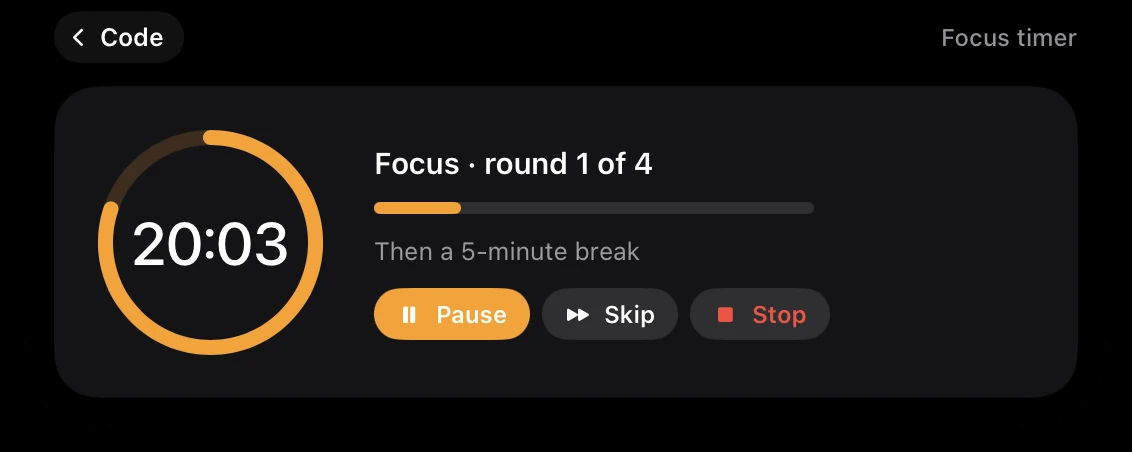
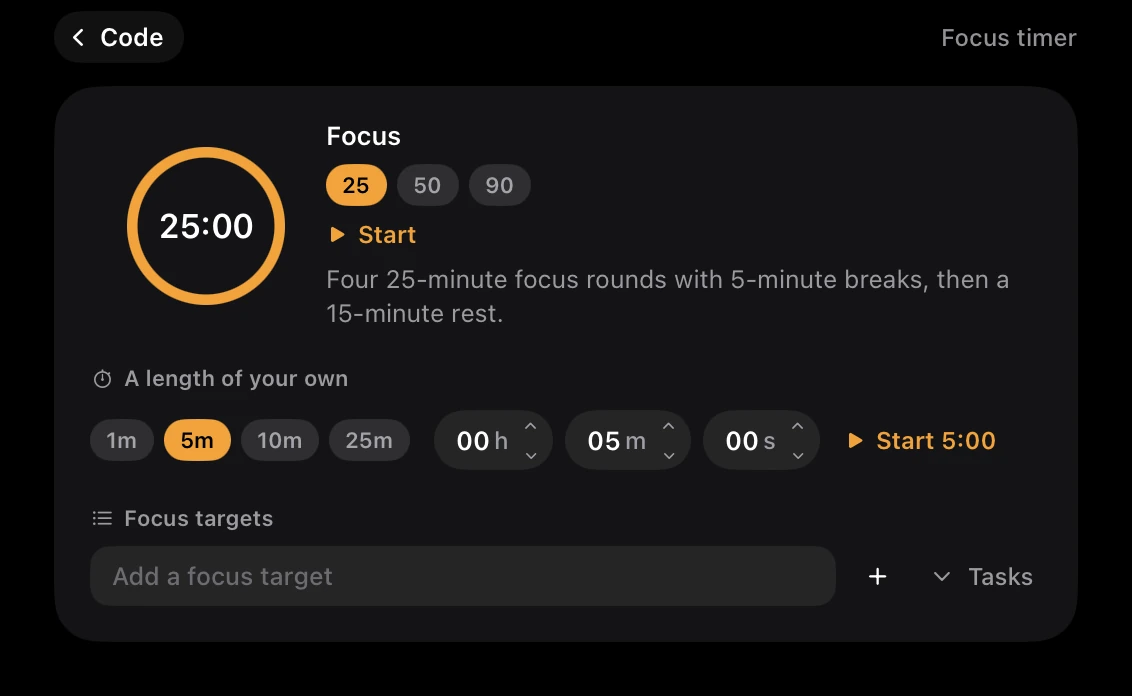
- 25 runs the Pomodoro rounds: 25 minutes of focus and a 5-minute break, four times, with a 15-minute break after the fourth. Each part starts the next by itself, with a chime.
- 50 and 90 are plain countdowns, and you can set a length of your own, from 1, 5, 10 or 25 minutes or any hours, minutes and seconds.
- Focus targets: type up to five things you are working on, or pick them from your open reminders, and tick them off as you go.
- Pause is on the widget, and Skip and Stop are on its screen. It does not turn on Do Not Disturb, so keep the step above.
- What it costs: starting the Focus timer is part of Crest Pro, or the free week: sign in from Crest and every Pro widget is yours for 7 days, no card. After that, Crest Pro, Take and Minutes come together: all three for $24.99 once, or $2.99 a month. Pausing and stopping a running timer never waits for Pro.
Pomodoro apps
| App | Price, read 7 October 2026 | What it does | Blocks apps |
|---|---|---|---|
| Clock (built in) | Free | One countdown at a time, restarted by hand; in the menu bar on macOS 27 | No |
| Crest | Crest Pro; 7 free days | 25 and 5 rounds that roll on by themselves, on the notch | No |
| Flow | Free basics; Pro $1.49 a month on its site | Work and break intervals, with statistics | Its Pro has app and web blockers, by its page |
Only Clock and Crest were tried on this Mac.
Flow is a dedicated Pomodoro app with statistics, free for the basics. Crest is the choice if you want the timer on the notch next to your music, calendar and coding agents rather than in another app.
Sources
- Apple, Clock User Guide: Set timers in Clock on Mac. Read 7 October 2026.
- Our own run, 7 October 2026, on a 16-inch MacBook Pro with macOS 27.0.1: Clock timers and Recents, the Timer switch in System Settings, Menu Bar, and Focus in Control Center. The two test timers were deleted from Recents afterwards and the Timer switch turned off again.
- Flow: flow.app/pricing. Read 7 October 2026; not installed.
- Crest 6.4.1, tried on this Mac on 7 October 2026, and its source: TimerManager.swift, FocusWords.swift, FocusScreen.swift and the Pro rule in LicenseManager.swift.
FAQ
Does a Mac have a Pomodoro timer?
Not as such. The Clock app's timers get close: make a 25-minute and a 5-minute timer once and restart them from Recents. macOS does not roll from work to break by itself.
How do I put a timer in the Mac menu bar?
On macOS 27, tick Timer in System Settings, Menu Bar. A running Clock timer then counts down in the menu bar. Show When Active hides it when no timer runs.
Is there a free Pomodoro timer for Mac?
Clock is free and built in, and Flow's basic timer is free by its own site. Crest's Focus timer, with rounds that run themselves on the notch, is part of Crest Pro with 7 free days.
How do I set a 25 minute timer on a Mac?
Open Clock, click Timers, click the minutes and type 25, then click Start. Add a label such as Focus and it stays under Recents for next time.
Does the Clock timer turn on Do Not Disturb?
No. Turn it on yourself in Control Center, Focus, Do Not Disturb, and off again for your break. Crest's Focus timer does not change it either.
Try Crest free
Download it with no account. Now Playing, the Shelf, the Clipboard and window snapping are free for good, and signing in gives you 7 days of Pro with no card. Pro, with Take and Minutes, is $24.99 once, on 2 Macs, or $2.99 a month.
Download Crest for macOS Get Crest Pro, $24.99Free forever. Pro free for 7 days, no card needed.
macOS 14 Sonoma or later · signed and notarized by Apple · 7-day refund
Keep reading: Calendar in the menu bar · Weather in the menu bar · Menu bar icons behind the notch · Clipboard history on a Mac · Best Mac notch apps in 2026 · Crest overview