Take vs Screen Studio: which Mac screen recorder should you buy?
By the makers of Take · updated 6 October 2026 · full disclosure

macOS 14 or later, on Apple Silicon and Intel. 7-day trial, no card, no watermark.
| Take | Screen Studio | |
|---|---|---|
| Price | $9.99 one-time | from $108/year subscription |
| One-time license for new buyers | Yes, pay once | No, its one-time license was discontinued |
| Live editing, preview equals export | Yes, no render step | No, project renders on export |
| Plain .mov files, no project format | Yes, a folder you own | No, project-based |
| Presents live in Meet and Zoom (virtual camera) | Yes, with the staged look | No |
Why Take is better
- You can still buy it once. Take is $9.99 once, and Screen Studio is subscription-only.
- Offline and private. After activation, capture, edit and export all run on your Mac, so nothing is uploaded.
- Drag to fix, no render wait. One compositor draws the preview and the file, so what you watch is exactly what you export.
- It goes live. Take Camera puts the staged screen straight into Google Meet, Zoom or FaceTime.
Download Take freeBuy Take, $9.99
macOS 14 or later · 7-day refund
Full comparison and details
You loved the Screen Studio look, then found out new buyers can only rent it now. Screen Studio is subscription-only for anyone buying today. We built Take to give you the same staged, auto-zoom look as a native Mac app you buy once for $9.99, running fully offline and saving plain files you own. Here is the side-by-side, with the Screen Studio facts taken from its own pages.
Last updated: 6 October 2026
Screen Studio pricing on 6 October 2026: $29 a month, or $108 a year, with no free plan and no lifetime licence.
Full disclosure: this page is published by the makers of Take, part of the Crest suite. Screen Studio's prices and limits are taken from its own pages.
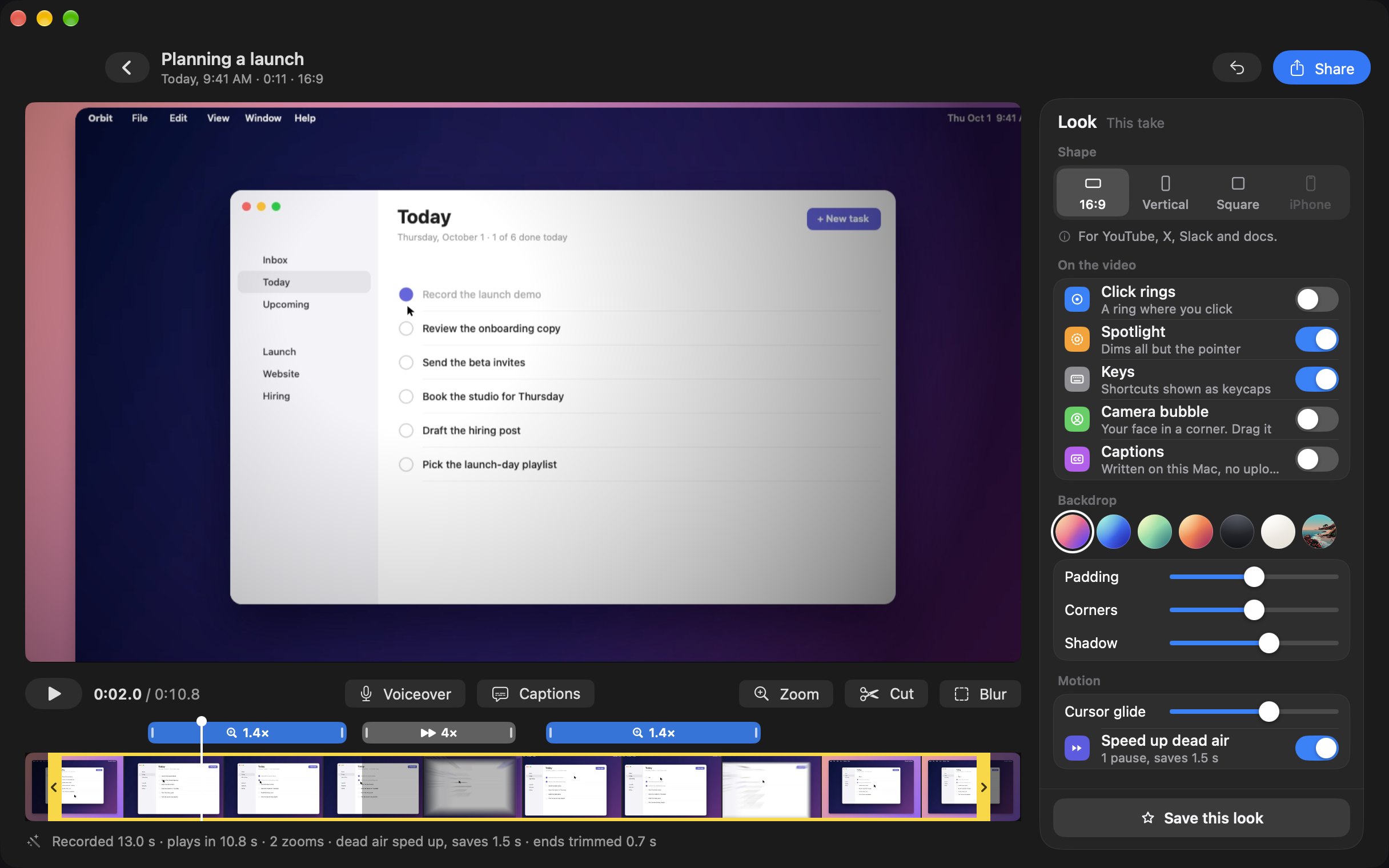
This is Take's editor: every zoom and speed-up sits on the strip, where you can drag or delete it, and the preview is the export.
The short version
Pick Take if you want the same staged, auto-zoom recordings for a one-time $9.99, running fully offline and saved as plain .mov files you own, with live editing where the preview is exactly the file you export. If you present in meetings, Take is also the only one of the two that can put that staged screen into Google Meet or Zoom live, through a virtual camera.
Side by side
The comparison table is at the top of this page.
The marks reflect each app's own documentation as of August 2026 and its pricing as of 6 October 2026. Screen Studio names and marks belong to their owners.
Where Take is better
- One-time price. Take is $9.99 once. Screen Studio moved new buyers to a subscription, $29 a month billed monthly or $9 a month billed yearly, and the old one-time license is no longer sold. If you record demos even a few times a month, Take pays for itself inside the first year and keeps saving you money after that.
- Offline and private. After a one-time activation, every capture, edit and export runs entirely on your Mac. Nothing you record is uploaded anywhere.
- Plain files you own. Every take is a .mov in a folder you choose, with no proprietary project format and no cloud library to escape from, so you open it, move it and back it up like any other file.
- Drag to fix, no render wait. Take has no Apply button. Trims, cuts, zooms, sped-up pauses and blurs sit on one strip, and one compositor draws both the preview and the final file, so the preview is exactly the export. Record a voiceover over the take after you stop, and fix the captions Take wrote on your Mac line by line. Screen Studio renders on export.
- The same staging where it counts. Take has auto zoom, a smoothed cursor, backdrops, click rings, keystroke keycaps, a camera bubble, mic and system audio, iPhone capture with real bezels, and a 9:16 vertical or .gif export.
- It goes live. Go live presents the same staged screen live: a virtual camera named Take Camera that Google Meet, Zoom and FaceTime can pick, with one-click switches for the bubble and the zooms. Screen Studio records, but it does not present live.
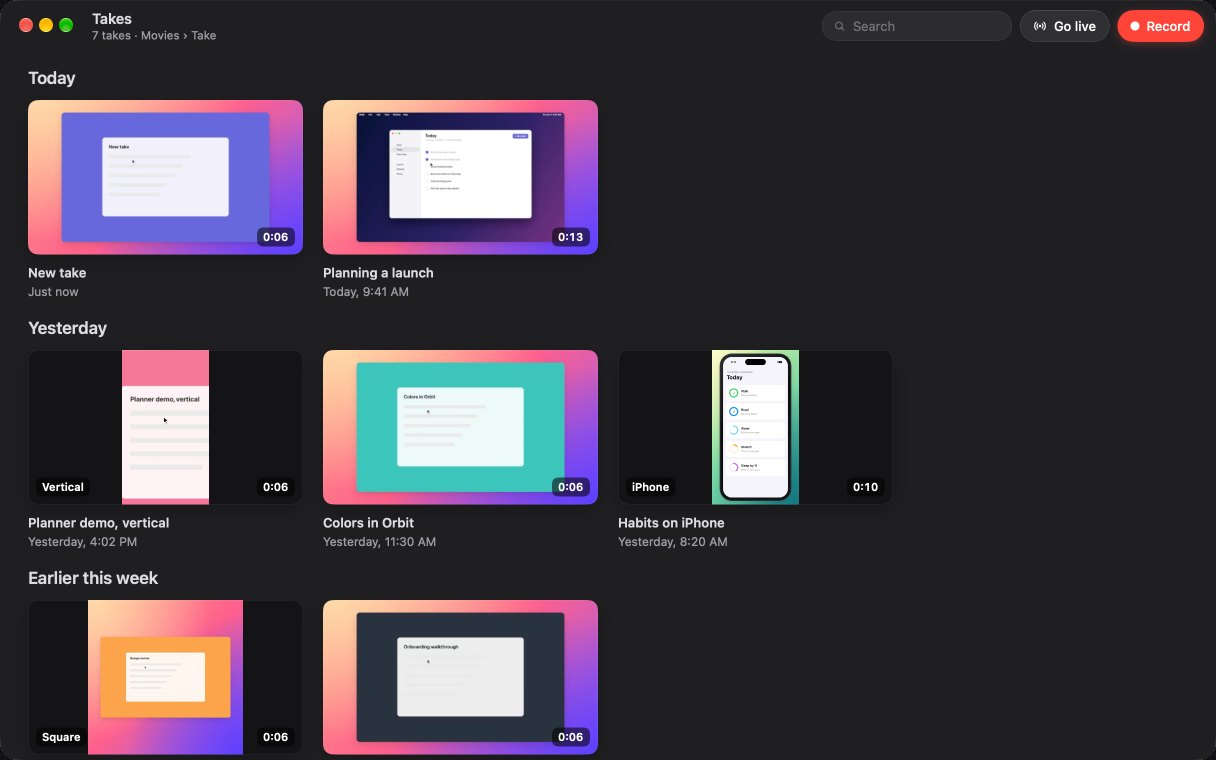
This is Take's library, where every recording is a plain .mov file rather than a project locked inside an app.
The pricing math
Screen Studio for a new buyer is a subscription: $29 a month billed monthly, or $9 a month billed yearly, from its own pricing section, checked 6 October 2026. The one-time license it used to sell is discontinued. Take is $9.99 one-time, with updates through Crest 7 on up to two Macs. Over two years that is $9.99 for Take against more than $200 in Screen Studio subscription fees. If you are choosing today and do not like renting the tools you use every week, that math is why Take exists.
Try before you decide
This is easy to settle yourself. Take has a 7-day trial with no card up front and no watermark, so you can record a real demo, export it and judge the file. Record the same clip you would have made in Screen Studio and compare the files. Get Take to start, or see the whole suite pricing.
FAQ
Is Screen Studio free?
No. Its pricing section lists two paid plans and no free one: $29 a month billed monthly, or $9 a month billed yearly, which is $108 a year. Both plans include every feature. Students and educators get 40% off. Checked on screen.studio on 6 October 2026.
Can I buy Screen Studio once, as a lifetime licence?
Not any more. Its FAQ says one-time licences were sold in the past and are no longer available for new purchases. A licence you already own stays valid, and you can renew it to get updates again. If you want to pay once, Take is $9.99 once.
Is Take cheaper than Screen Studio?
Yes. Take is $9.99 one-time. Screen Studio is subscription-only for new buyers: $29 a month billed monthly, or $9 a month billed yearly, and its old one-time license is discontinued. Over two years Take stays $9.99 while a Screen Studio subscription runs past $200.
Is Take better than Screen Studio?
Yes, on the things you live with every day: you pay once instead of every month, everything runs offline, your recordings are plain .mov files you own, editing is live with no render step, and it can present the staged screen live in a call.
Do Take and Screen Studio edit the same way?
Both stage automatically with auto zoom, a smoothed cursor and a backdrop. The difference is the workflow. Take edits live, so the preview on the canvas is exactly the file you export, with no separate render step. Screen Studio is project-based and renders on export.
Can Take record my iPhone like Screen Studio?
Yes. Take captures a connected iPhone or iPad, frames it in an accurate device bezel, and exports a 9:16 vertical for Reels and Shorts.
Do I own my Take recordings?
Yes. Every take is a plain .mov file in a folder you choose, with no watermark, no proprietary project format and no cloud library. Screen Studio keeps projects in its own format with a render step before you get a shareable file.
Can either app present live in Google Meet or Zoom?
Take can. Go live adds a virtual camera named Take Camera that Meet, Zoom and FaceTime can pick, carrying the staged screen live: backdrop, cursor, zooms toward your clicks and your face in the bubble. Screen Studio is a recorder and editor, and it does not output a virtual camera.
Record once. Ship the demo.
Take stages every capture and edits it live, so the recording you export is the one you already watched. You get plain files with no watermark, and you never need a subscription: Take is $9.99 once.
Buy Take, $9.99 Try free for 7 days7-day trial, no card up front. macOS 14 or later, universal (Apple Silicon and Intel).
More comparisons: Screen Studio alternatives · Best Mac screen recorders in 2026 · vs Loom · vs CleanShot X · vs Descript · vs Camtasia · vs ScreenFlow · Loom alternatives for Mac · No watermark, no time limit · Record a demo that looks edited · Take overview